RV630 branded as a budget chip, better than the 7300GT?
- RRP: £75 – £85
- Release date: March 22 2006
- Purchased in August 2025
- Purchase Price: £18.37
Note: Some in-game screenshots are from previous tests with other systems
At the end of the fixed‑pipeline era, both ATI and Nvidia decided to use their mid‑range GPUs to top out the budget end of their product stacks, creating the X1300XT (with the die of an X1650) and the 7300GT (with the die of a 7600).
I looked at the Gainward Bliss Geforce 7300 GT here which I found very cool, it was a great performer compared to actual budget parts of the time, lesser 7300’s where absolutely nowhere in comparison.
I was such a fan of the 7300GT that I really wanted to find an X1300XT to compare it to. X1300’s are everywhere but the XT model seems to be reasonably rare.
There was just the one one example on eBay that had been sitting with a Buy It Now price for months. Eventually the seller reduced the price a little, but I still ended up paying more than I wanted for an unboxed Sapphire example.
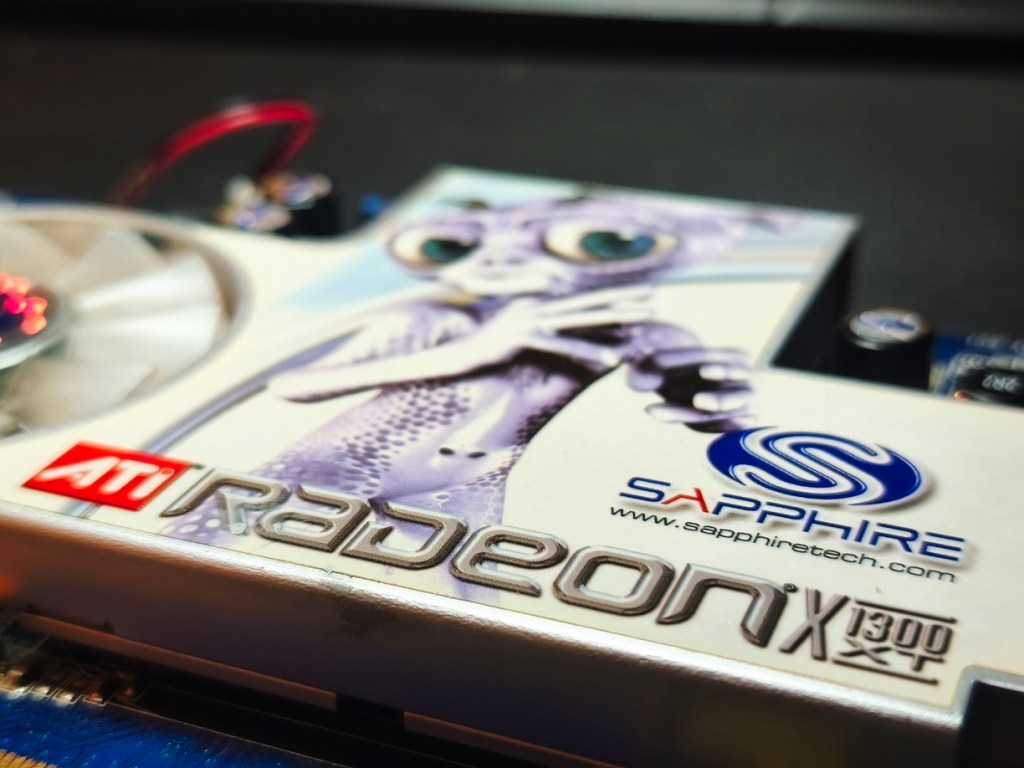
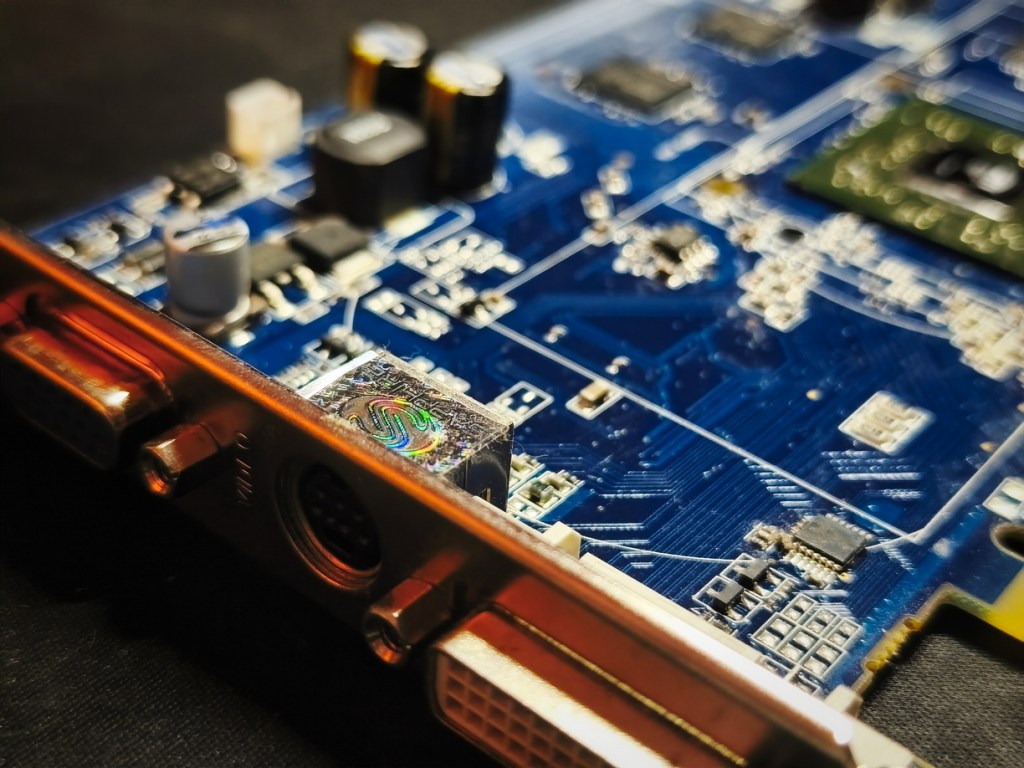
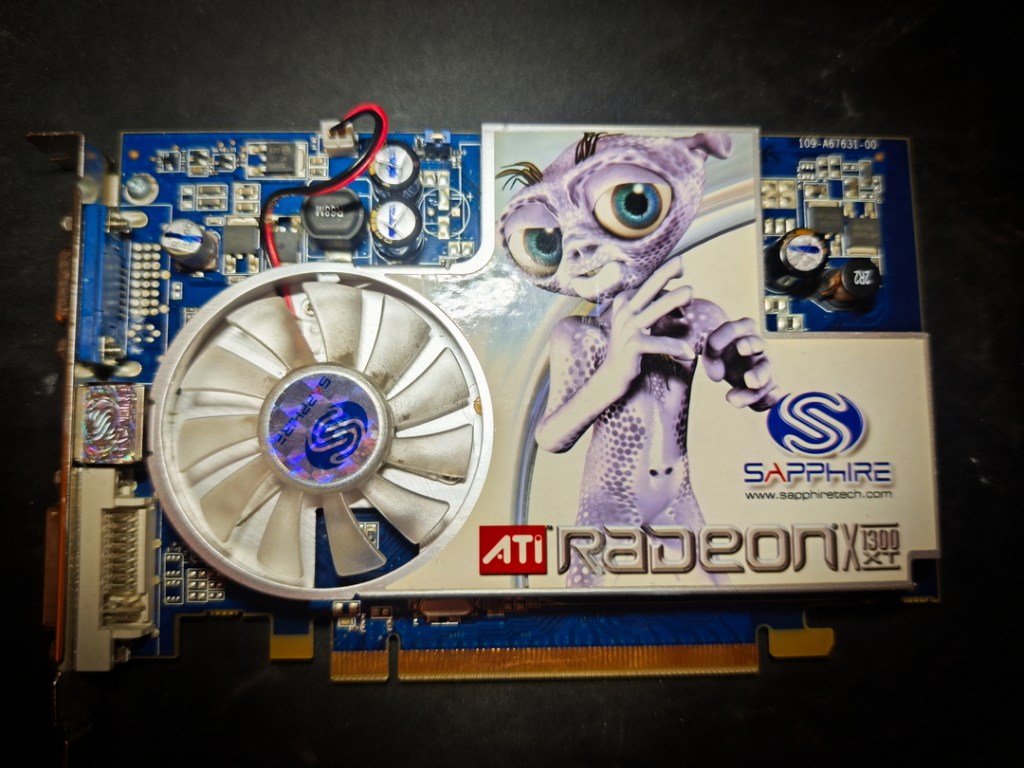
I do love Sapphire though, and this one comes with the standard blue PCB with the alien theme, matching their other cards of the time. It’s a tidy‑looking card and very slim compared to the two‑slot 7300GT.
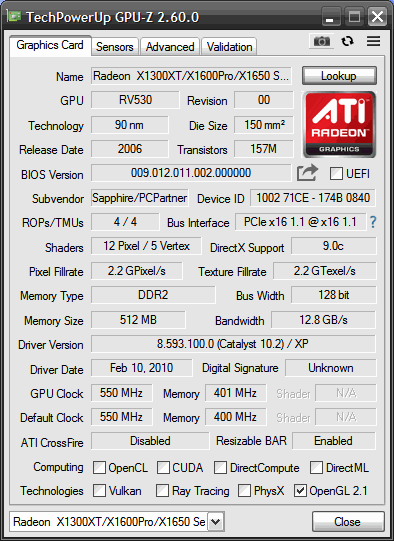
Sadly, we’re only rocking DDR2 on this card. This is going to put it at a disadvantage against the GDDR3 of the 7300GT.
Wikipedia suggests that all X1300XT models only had DDR2, but there is plenty of internet evidence that this is nonsense. We do have 512MB of the slower stuff though, up from the more common 256MB at least.
Based on the results I found when messing with the Lenovo HD2600XT 512Mb when comparing it to a 256Mb card, twice the RAM doesn’t really give much improvement. If that card lacked the power to take advantage of it, I doubt this X1300XT ever will. It seems that, at 1280×1024 or below on XP‑era games struggle to fill even a 256MB buffer.
Introduction – RV530
Background to the chip powering the X1300XT/X1600/X1650
Released in late 2005, ATI’s Radeon X1000 series marked the company’s first fully DirectX 9.0c compatible, Shader Model 3.0 family and a clean architectural break from the long‑running R3xx/R4xx designs that had carried them through the DX9 era.
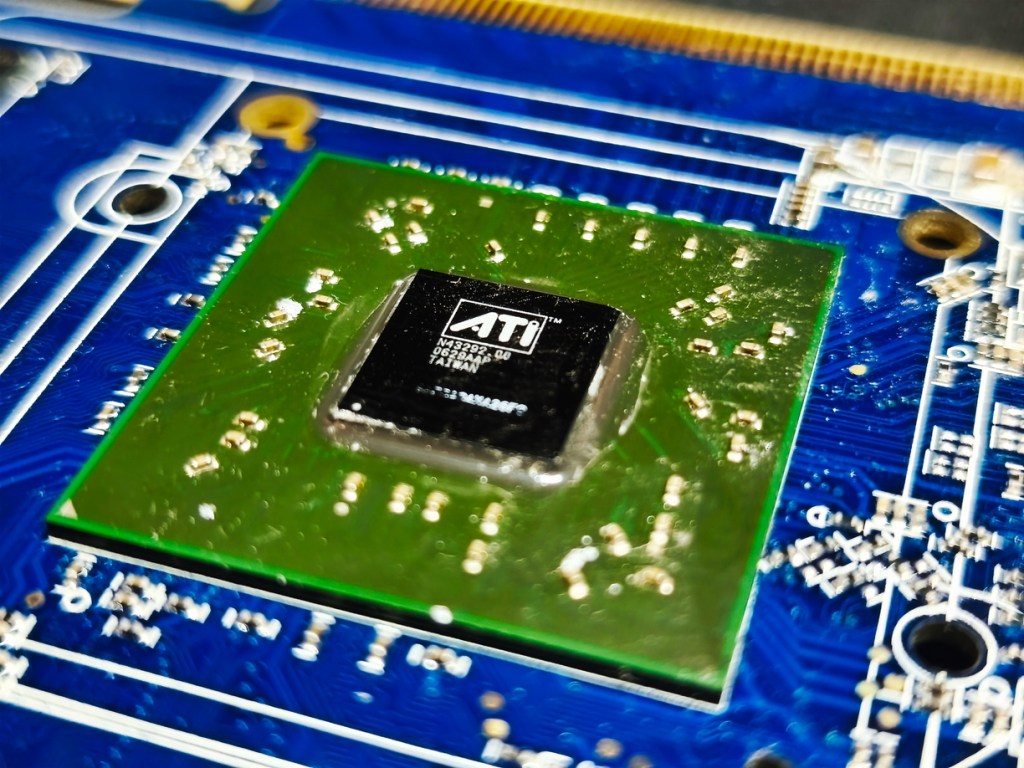
Built around the RV530 GPU used in the Radeon X1600‑series cards, this mid‑range core squietly did the heavy lifting in OEM and retail systems that needed “real” 3D without paying X1800 money.
Sitting below the larger RV520 core used in the Radeon X1800, RV530 brought much of the same feature set to a smaller die and more affordable segment.
While it looked like just another incremental refresh on the surface, this generation brought several important refinements and feature maturations, including:
- A more granular, SM3.0‑capable shader engine with efficient branching for the time.
- AVIVO video processing for improved decoding, scaling and colour correction in an era when HTPCs were becoming popular.
- A flexible memory controller that allowed everything from narrow, cheap DDR2 to faster GDDR3 configurations, massively changing the character of each board.
- CrossFire support across much of the stack, giving ATI a multi‑GPU answer to Nvidia’s SLI.
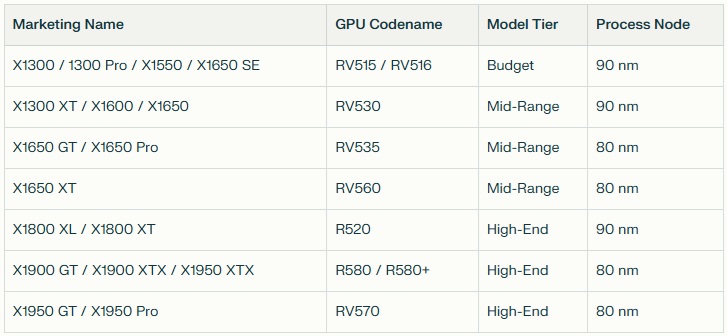
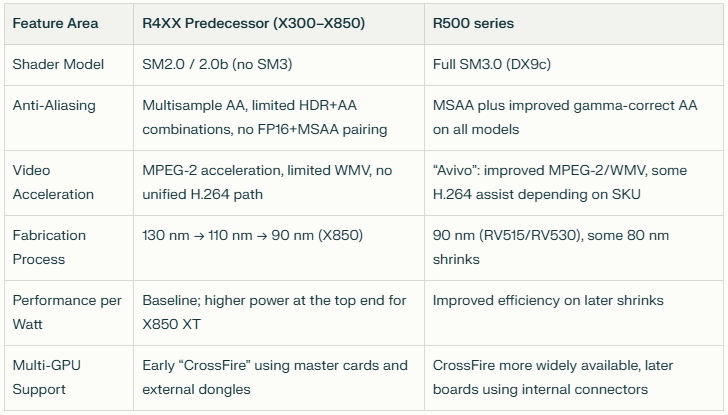
Below is a general overview the RV500 family, it is very confusing though with marketing names being all over the place:
Where the older R3xx/R4xx designs were fixed‑function, SM2.0‑class parts with strong brute‑force fillrate and AA performance for their time, the X1000 series moved to fully SM3.0‑capable pipelines with more emphasis on shader flexibility and branching. This brought ATI up to feature parity with Nvidia’s contemporary GeForce 7 cards while laying the groundwork for more complex shader‑heavy games that would follow.
The X1000 family used smaller, more advanced process nodes than the outgoing high‑end R4xx chips, allowing ATI to push clocks higher on parts like the X1800 and X1900 while still bringing mid‑range dies such as RV530 into more modest power envelopes.
That shift enabled boards like the X1600 and X1300XT to offer “real” 3D capability in slimmer, quieter systems that would have struggled with the heat and power demands of earlier high‑end cards.
Where the GeForce 7 line can be seen as a refined GeForce 6, the X1000 series was closer to a generational rethink of ATI’s desktop architecture rather than a light touch‑up. The result was a family that straddled two eras: still rooted in fixed‑function thinking at the low end, but clearly steering towards the more programmable, shader‑centric workloads that would define the late DirectX 9 and early DirectX 10 years.
The Test System
Details are as follows:
- CPU: AMD Phenom II X4 955 3.2Ghz Black edition
- 8Gb of 1866Mhz DDR3 Memory (showing as 3.25Gb on 32bit Windows XP and 1600Mhz limited by the platform)
- Windows XP (build 2600, Service Pack 3)
- Kingston SATA 240Gb SSD
- MSI 970 Gaming MS-7693 (note – a different board to the board used in the 7300GT and X1300Pro tests, this to facilitate future SLI/Crossfire tests)
- Driver Version 8.593.100 (Catalyst 10.2)
Comparison with 7300GT and X1300Pro
There are two relevant cards that were tested before, the main difference to these exact versions are below:
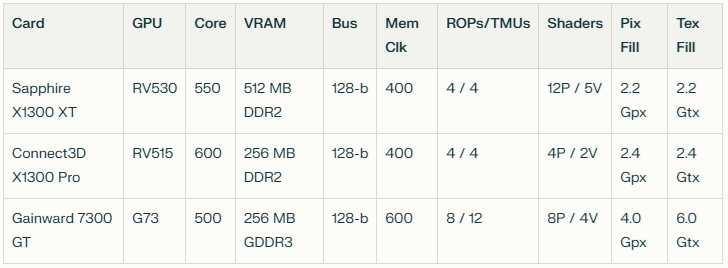
It should be noted that the Gainward version of the 7300GT is very high‑end, being the overclocked “Golden Sample” version. A lesser 7300GT would likely be less impressive. Also, DDR2 vs DDR3…. quite the handicap.
The clock speed may be lower, but that memory is going to be a huge advantage.
ROPs and TMUs are matched with the XT card at least. The X1300Pro does come with an impressive GPU clock.
As for shader pipelines, the X1300XT is far ahead of the competition with 12 pixel pipelines and 5 vertex pipelines.
Moto Racer 3 (2001)
Minimum: Windows 98/ Pentium III 450 MHz / 16 MB DirectX 8 GPU / 64 MB RAM;
Recommended: Windows XP / Pentium III 600 MHz / 32 MB DirectX 8 GPU / 128 MB RAM.

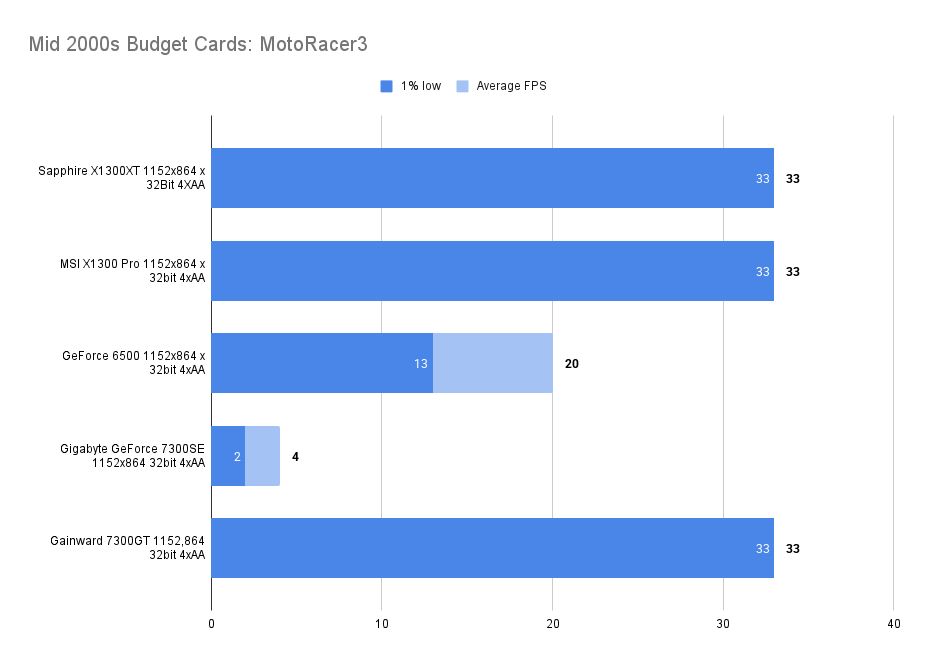
An old DX8 game that you would think all cards could hit the lowly 33fps frame cap, not a problem for the X1300XT.
Return to Castle Wolfenstein (2001)
Minimum: Windows 95/400 MHz Pentium II/16 MB OpenGL GPU/128 MB RAM;
Recommended: Windows XP/600 MHz Pentium III/32 MB OpenGL GPU/256 MB RAM.

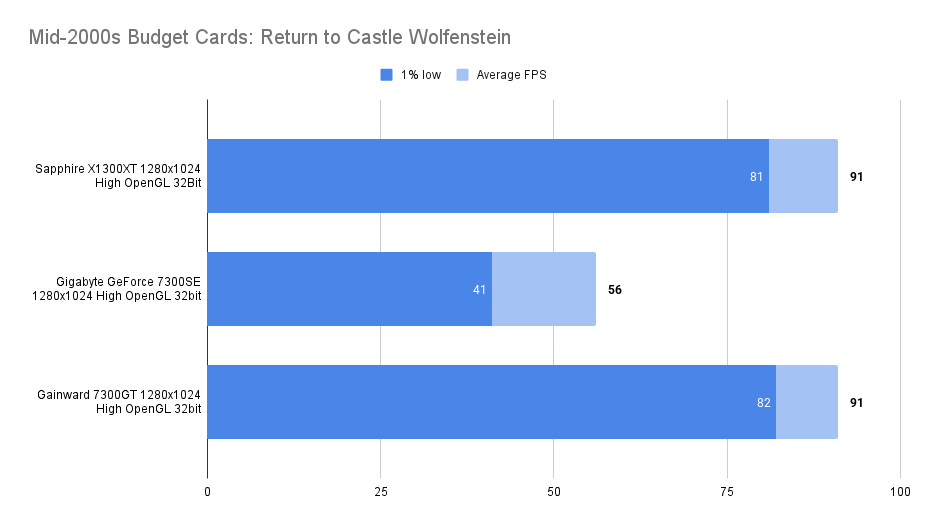
Nice, smooth performance in RTCW. This was playable even on the dire 7300SE, so no surprise really. The 1% low was a single frame lower than the 7300GT — margin‑of‑error stuff on this forgiving OpenGL title.

Mafia (2002)
Minimum: Windows 98/500 MHz Pentium III/16 MB DirectX 8.1 GPU/96 MB RAM
Recommended: Windows XP/700 MHz Pentium III/32 MB DirectX 8.1 GPU/128 MB RAM.
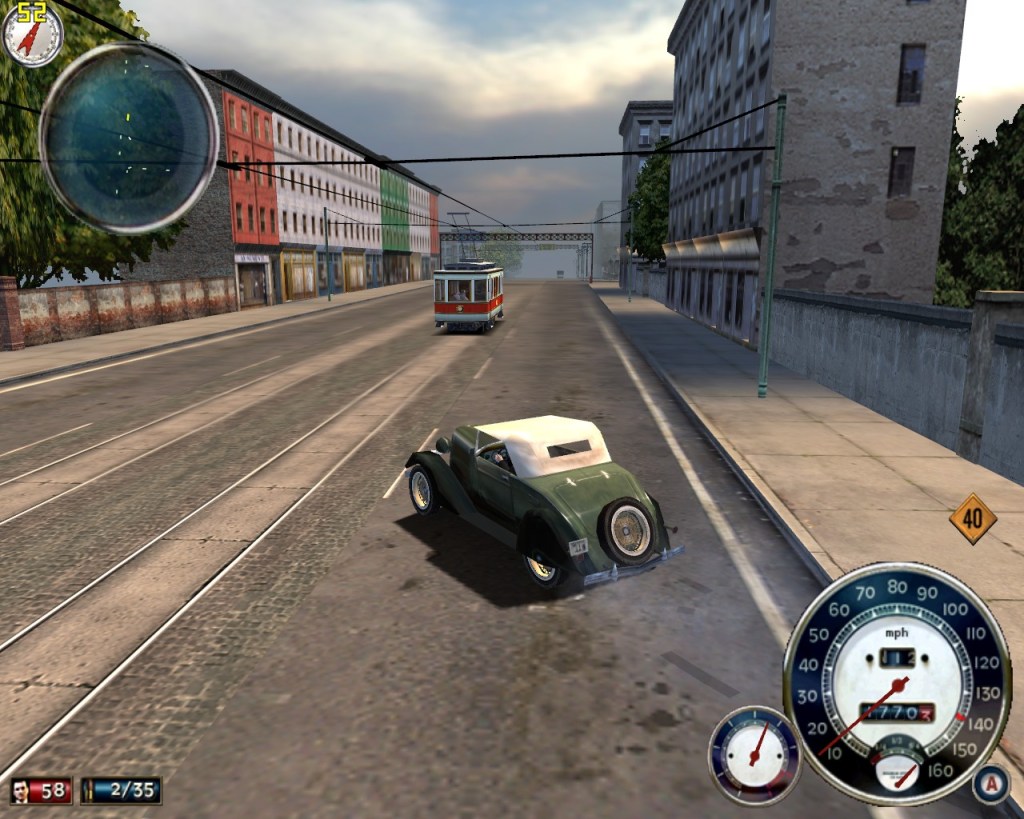
Mafia is another game that you would expect a mid-range GPU (even a budget-branded one) from 2006 to handle with no issue – juste look at the minimum specs.

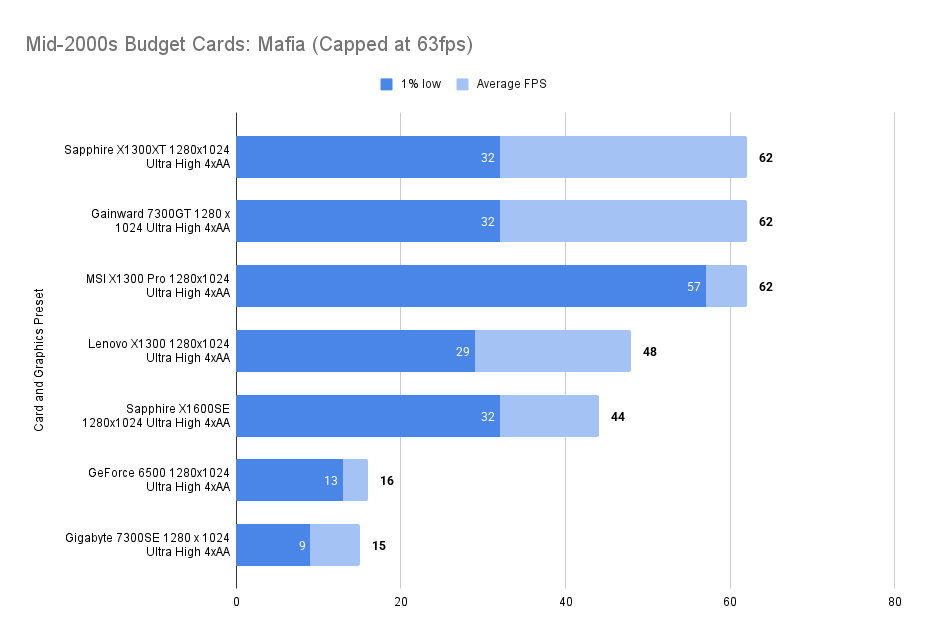
The Frame limit of 62 is hit and the 1% low matches the 7300GT and the X1600SE.
Mafia is another game you’d expect a mid‑range GPU (even a budget‑branded one) from 2006 to handle with no issue — just look at the minimum specs.
The frame limit of 62 is hit, and the 1% low matches the 7300GT and X1600SE.
Unreal Tournament 2003
Minimum: Windows 98/ME/2000/XP, Pentium III 733 MHz, DirectX 8.1, TNT2/Kyro II/Voodoo 3/Radeon 7000 (16 MB), 128 MB RAM;
Recommended: Windows XP, Pentium 4 1 GHz, DirectX 8.1 or higher, GeForce2/Radeon 8500 (64–128 MB), 256 MB RAM.

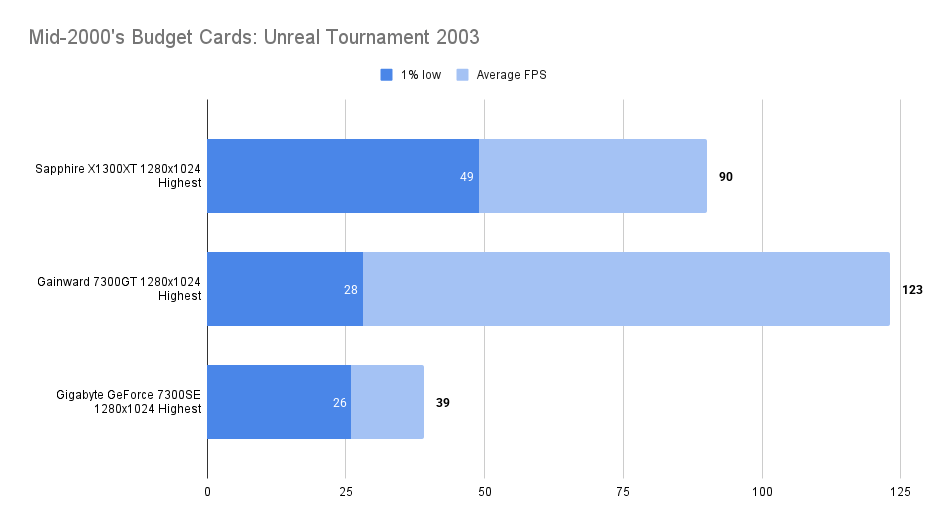
The X1300XT gives a good 90fps average. The 1% low of 49fps seems disappointing, but compared to the 7300GT it’s actually a big improvement.

FarCry (2004)
Minimum: Windows 98SE/2000/XP, Pentium III 1 GHz, DirectX 9.0b, GeForce2 MX/Radeon 7000 (64 MB), 256 MB RAM
Recommended: Windows XP, Pentium 4 2 GHz, DirectX 9.0b or higher, GeForce4 Ti/Radeon 9500 (128 MB), 512 MB RAM.

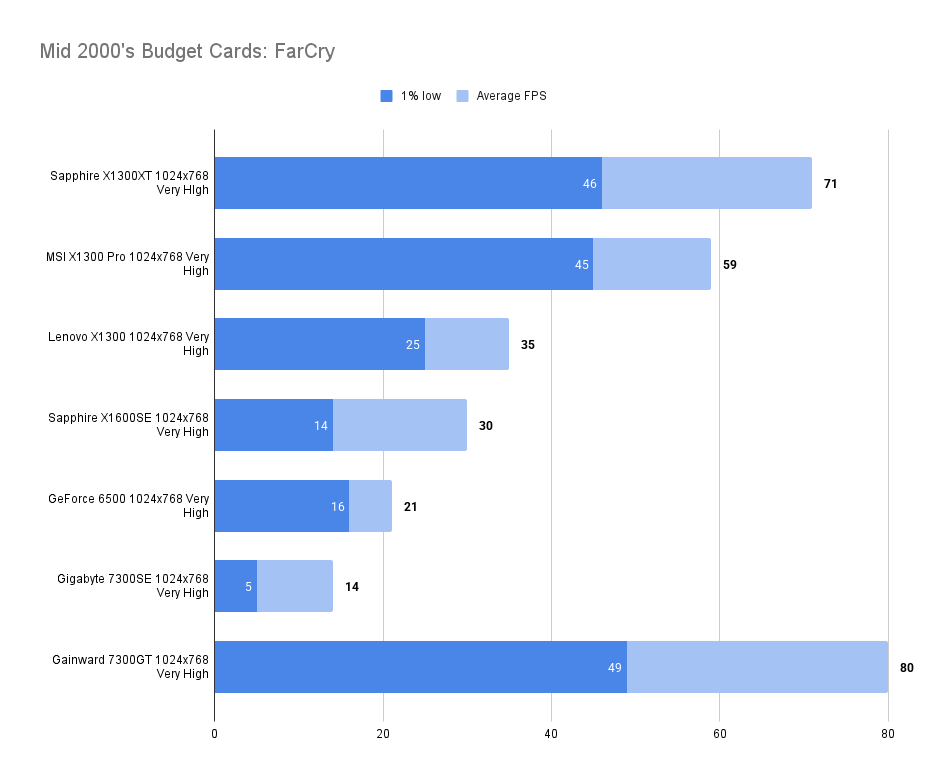
Great performance at very high settings at 1024×768. The Nvidia card does steal a win in average framerates and 1% lows, but it’s close enough to wonder if a GDDR3 version would give parity.
Doom 3 (2004)
Minimum: Windows 2000/XP, Pentium IV 1.5 GHz, DirectX 9.0b, GeForce 3/Radeon 8500 (64 MB), 384 MB RAM
Recommended: Windows XP, Pentium IV 2 GHz, DirectX 9.0b, GeForce 4 Ti/Radeon 9700 (128 MB), 512 MB RAM.
The legendary Doom3, the 7300GT was a great performer in this game, could the X1300XT keep up?

Well… no. Not even close.
The X1300XT manages 54fps compared to the 111fps of the 7300GT — nearly double the performance.
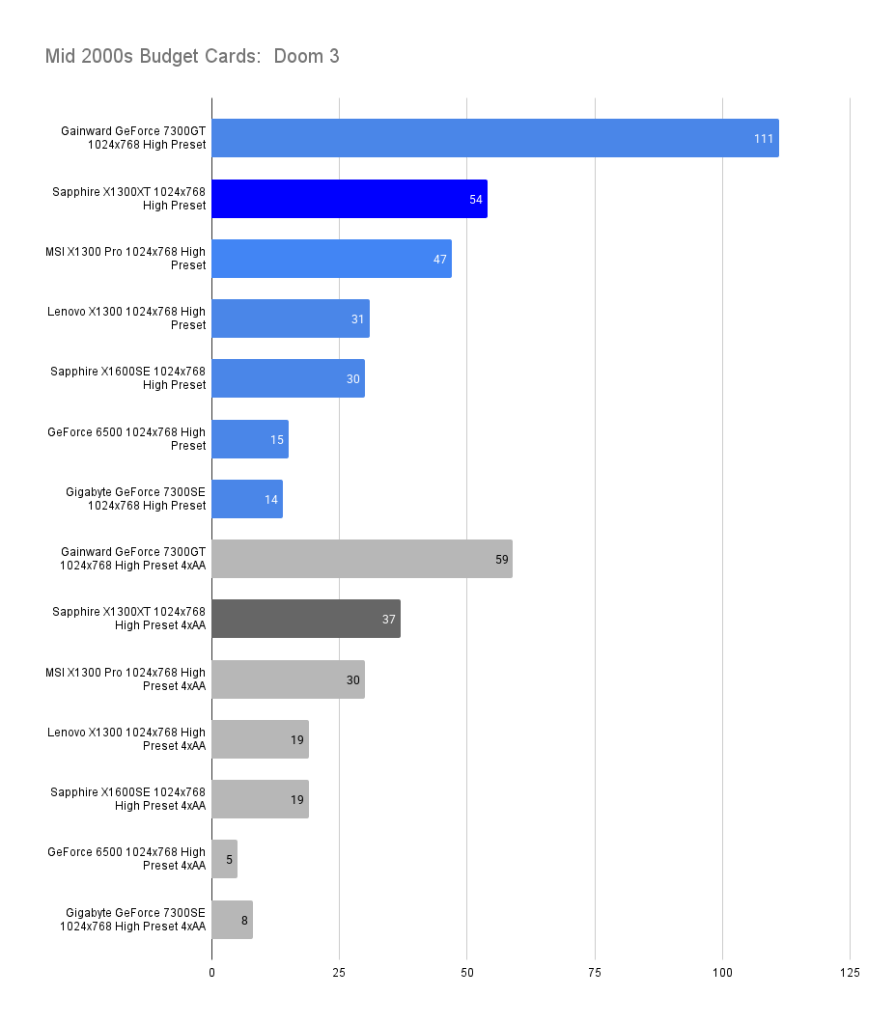
With AA enabled, the difference is narrower but then 37fps for a fast paced shooter is perhaps unplayable where the 59fps of the 7300GT may not be.
Medieval II: Total War (2006)
Minimum: Windows 2000/XP, Pentium 4 1.5 GHz, DirectX 9.0c, GeForce 4 Ti 4400/Radeon 9600 SE (128 MB), 512 MB RAM
Recommended: Windows XP, Pentium 4 2.4 GHz, DirectX 9.0c, GeForce 7300/Radeon X1600 (256 MB), 1 GB RAM.
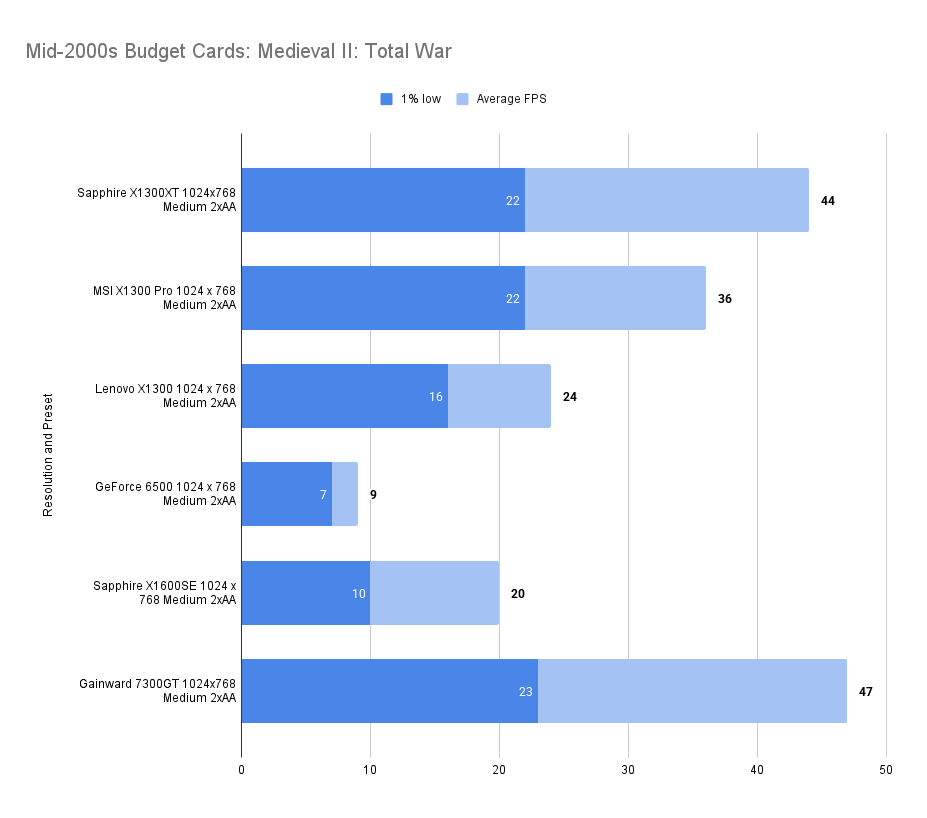
A playable average of 46fps. The 1% low of 24fps isn’t ideal but matters less in a strategy title. The other contenders show similar lows.
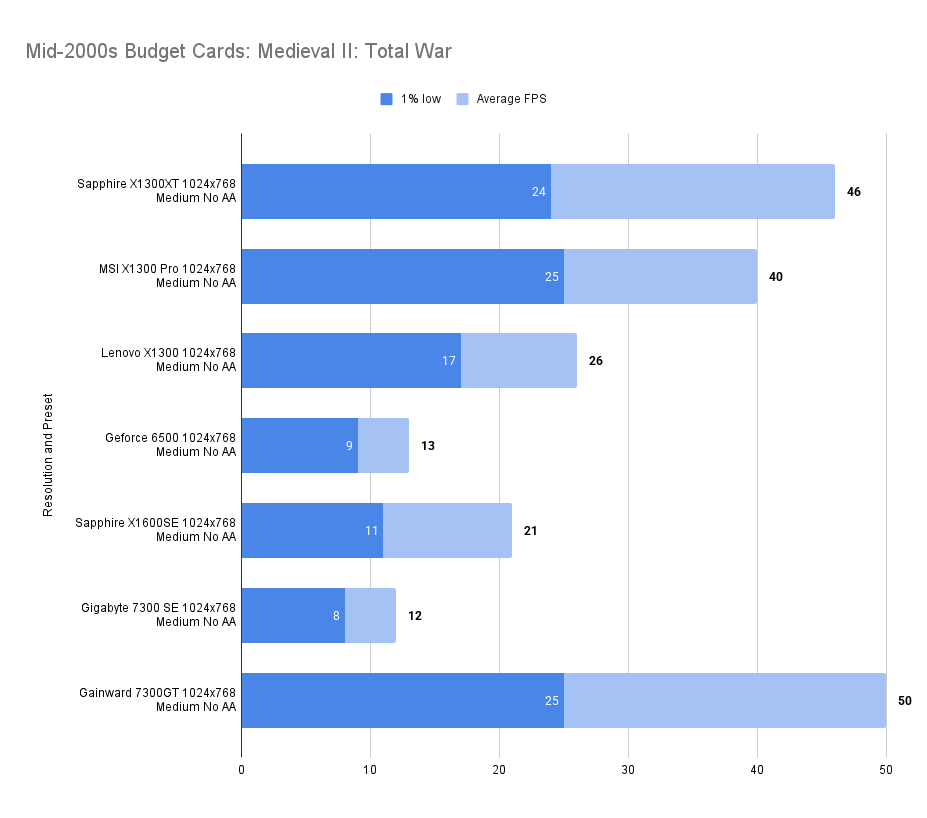
A little AA doesn’t make a whole lot of difference in this game on any card.

FlatOut 2 (2006)
Minimum: Windows 98/ME/2000/XP, Pentium 4 2.0 GHz, DirectX 9.0c, 64 MB 3D GPU (e.g. GeForce FX 5200 or Radeon 9600 Pro), 256 MB RAM, 3.5 GB HDD;
Recommended: Windows XP, Pentium 4 3.0 GHz, 256 MB 3D GPU (e.g. GeForce 6600 GT or Radeon X1600), 512 MB RAM
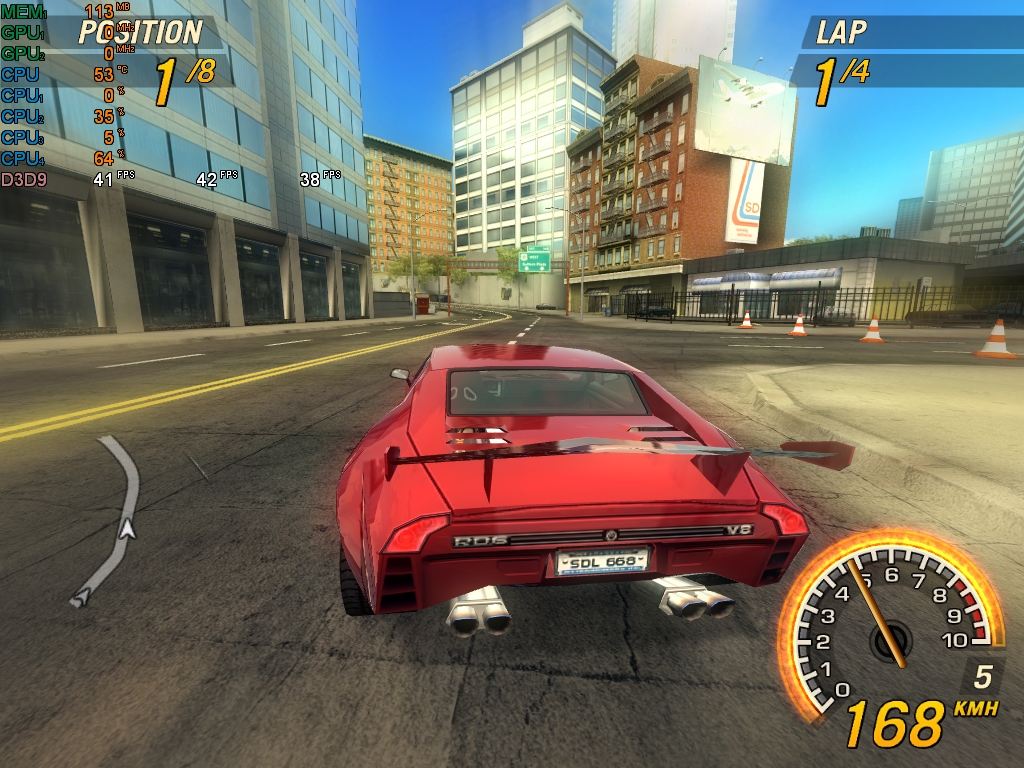
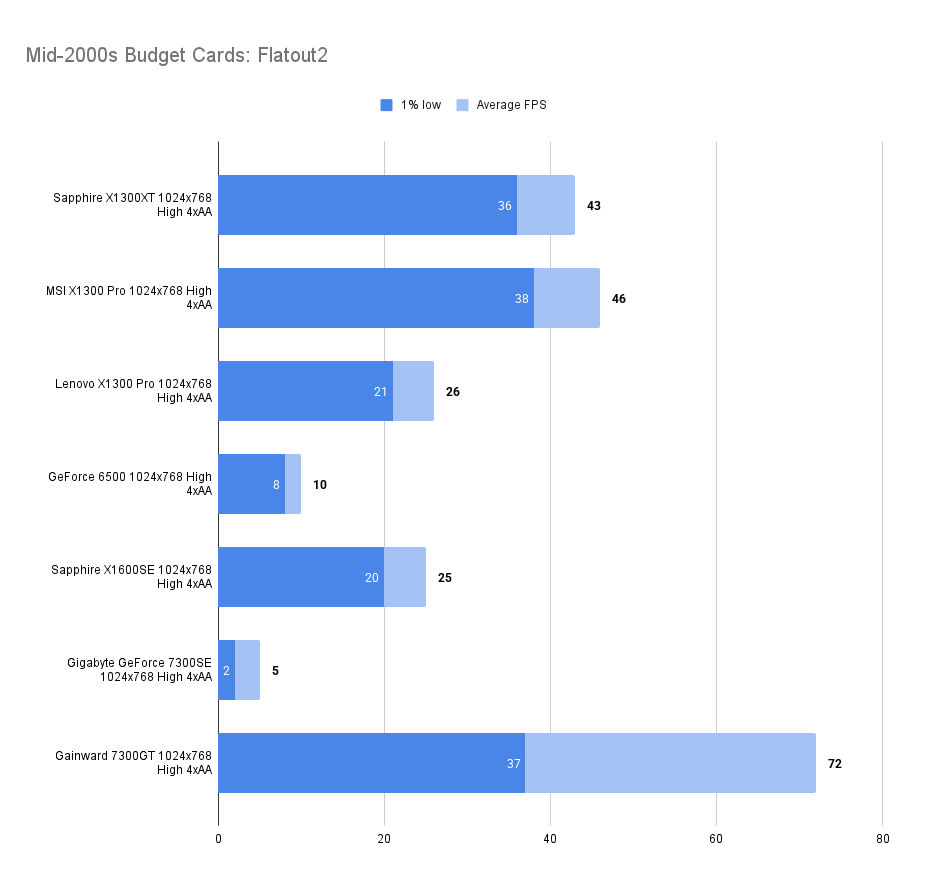
A strange result — with all features turned on, the XT cannot beat the X1300Pro. That higher clock speed must be important.
The Gainward 7300GT was is untouchable at these settings.
The Elder Scrolls IV: Oblivion
Minimum: Windows XP/Pentium 4 2 GHz/128 MB DirectX 9.0c GPU (e.g. GeForce FX/Radeon 9600)/512 MB RAM
Recommended: Windows XP/Pentium 4 3 GHz/ATI X800 or GeForce 6800 (256 MB)/1 GB RAM.
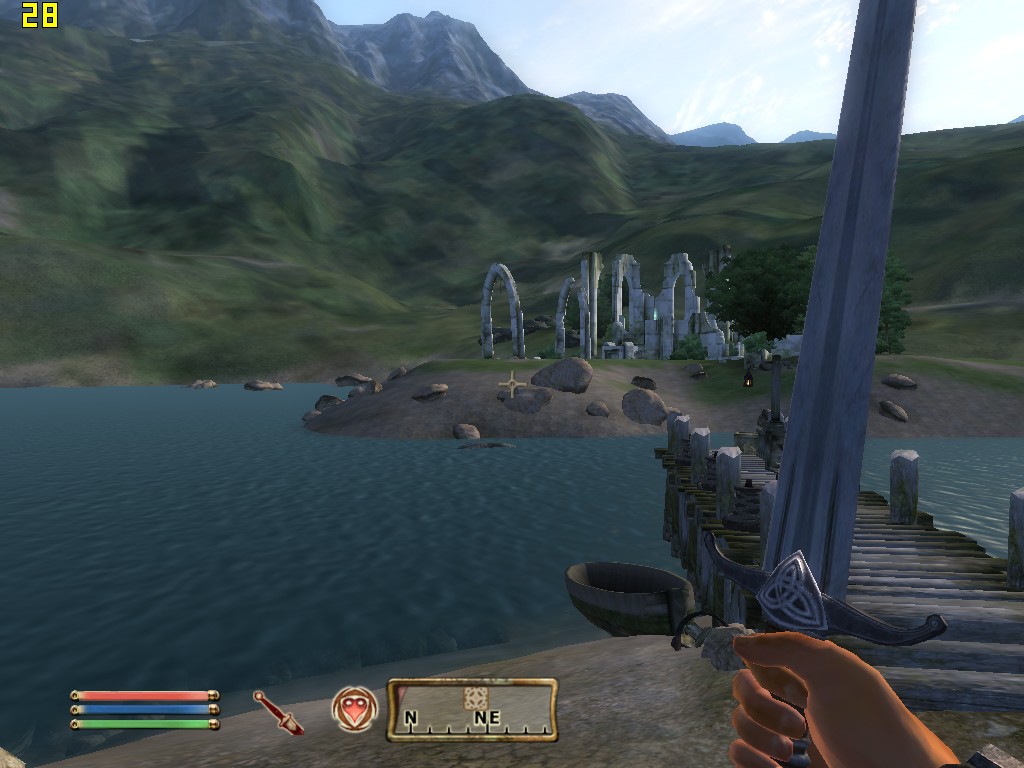
A tough ask for any budget card, at Medium Settings here, the XT performs well, beating the 7300GT in 1% low, if not quite matching the average framerate.
It also pulls ahead of the X1300Pro by a decent margin, features over raw clock speed in this one it seems.
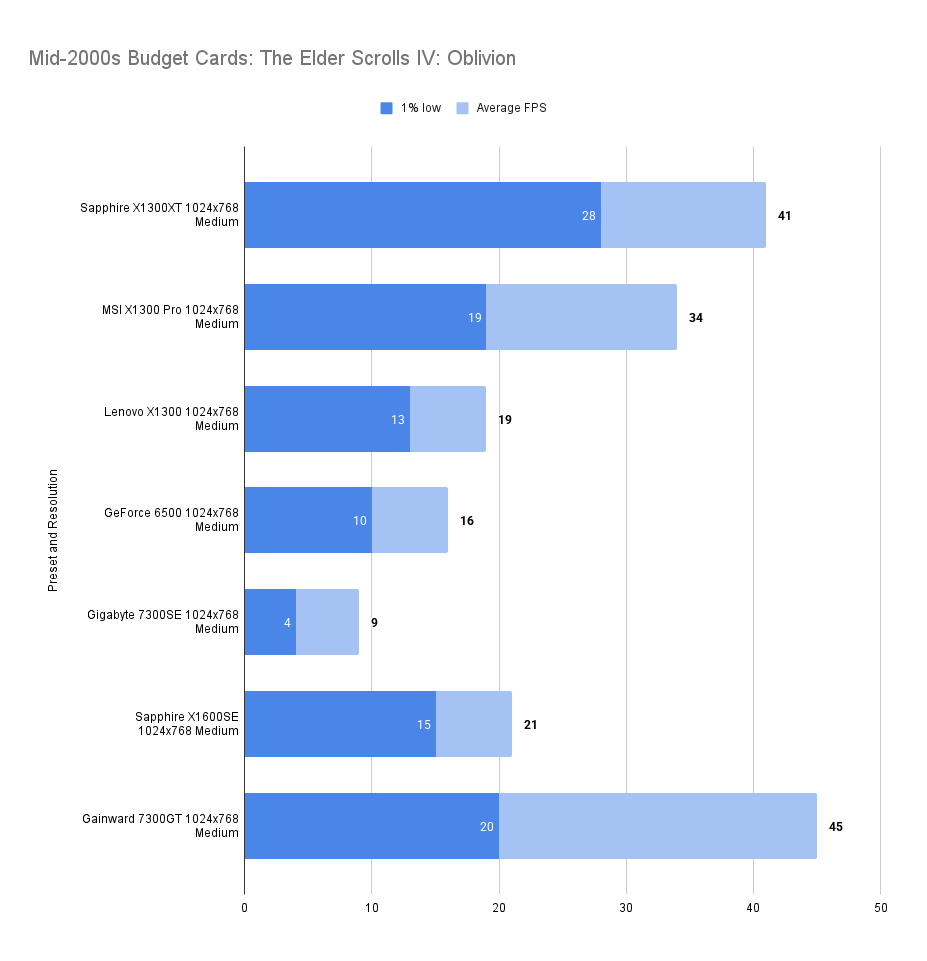
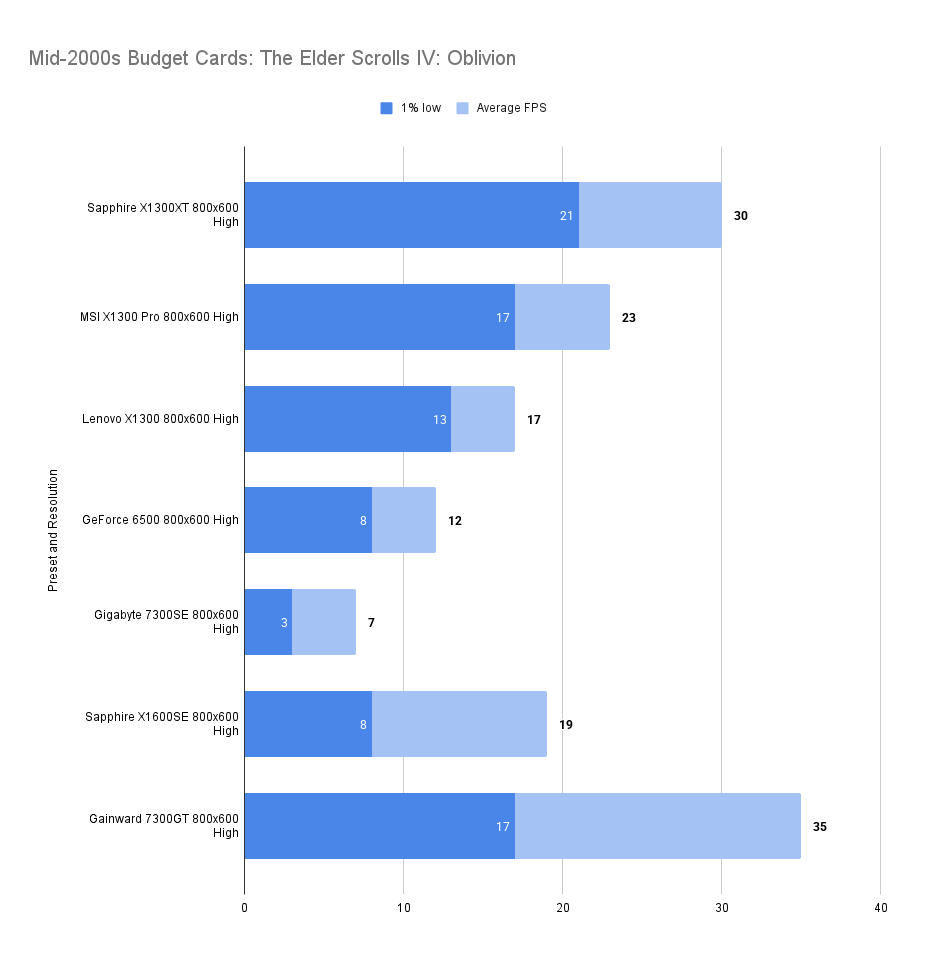
At high settings margins remain largely similar, though the 1% Low settings have become closer, our X13000XT losing it’s previous lead.
Just Cause (2006)
Minimum: Windows 2000/XP/Pentium IV 1.4 GHz/64 MB DirectX 9.0c GPU with Shader Model 1.1 (e.g. GeForce 4 Ti 4200 or Radeon 9500)/512 MB RAM/5.8 GB disk space.
Recommended: Pentium IV 2.8 GHz or Athlon 64/256 MB Shader Model 2.0 GPU (e.g. GeForce 7 series)/1 GB RAM/7.4 GB disk space.

Falling behind the 7300GT again, though with better 1% lows.
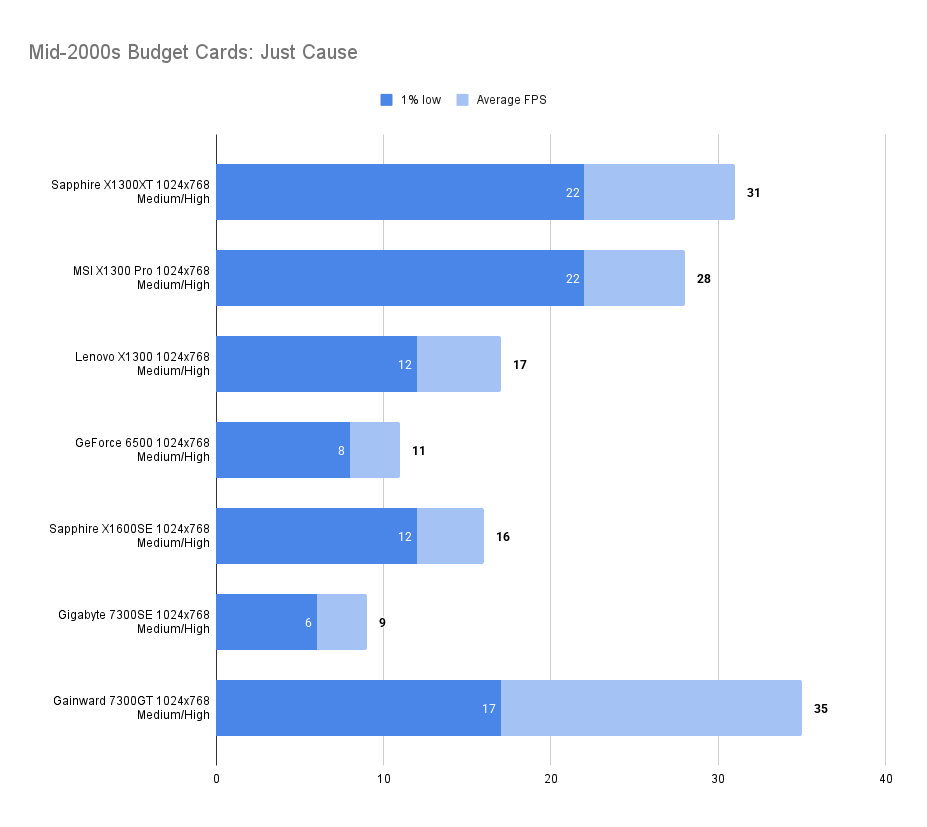
Settings as follows:

S.T.A.L.K.E.R.: Shadow of Chernobyl (2007)
Minimum: Windows XP/2000 SP4, Pentium 4 2.0 GHz or AMD XP 2200+, 128 MB GPU (GeForce 5700 or Radeon 9600), 512 MB RAM, DirectX 9.0c, 10 GB disk space
Recommended: Core 2 Duo E6400 or Athlon 64 X2 4200+, 256 MB GPU (GeForce 7900 or Radeon X1950), 1.5 GB RAM, same OS and disk space

A rare win for the X1300XT over the X1300Pro in both average framerate and consistency.
Even in this game, we are far from filling a 256Mb buffer, let alone the 512Mb we have on the XT.
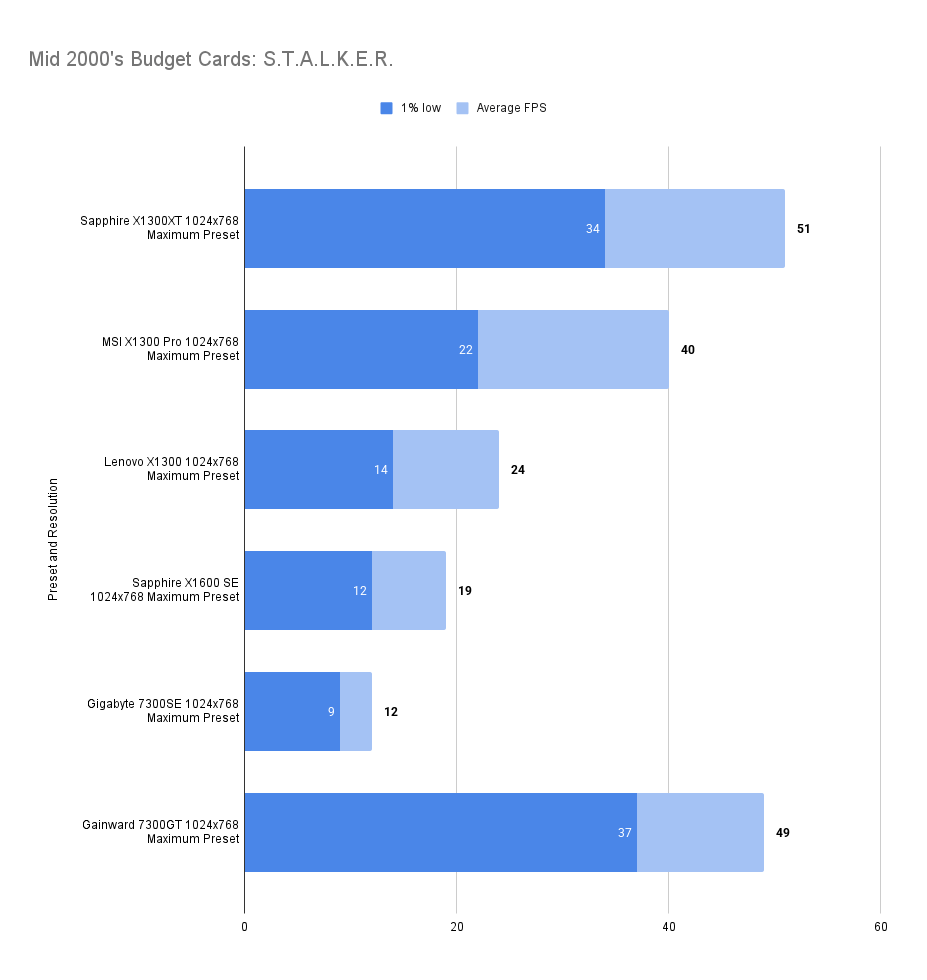
Note this is all using static lighting, don’t be tempted to touch that Render button as performance drops off a cliff.


Crysis (2007)
Minimum: Windows XP/Vista, Pentium 4 2.8 GHz (3.2 GHz for Vista), 1 GB RAM (1.5 GB for Vista), 256 MB GPU (GeForce 6800 GT or Radeon 9800 Pro), DirectX 9.0c/10, 12 GB disk space
Recommended: Core 2 Duo @ 2.2 GHz or Athlon 64 X2 4400+, 2 GB RAM, 512 MB GPU (GeForce 8800 GTS or Radeon X1800), same OS and disk space
A very similar result to the 7300GT — the slower RAM doesn’t seem to be a handicap here.
A good increase over the X1300 Pro also, you’d probably end up playing with these settings.
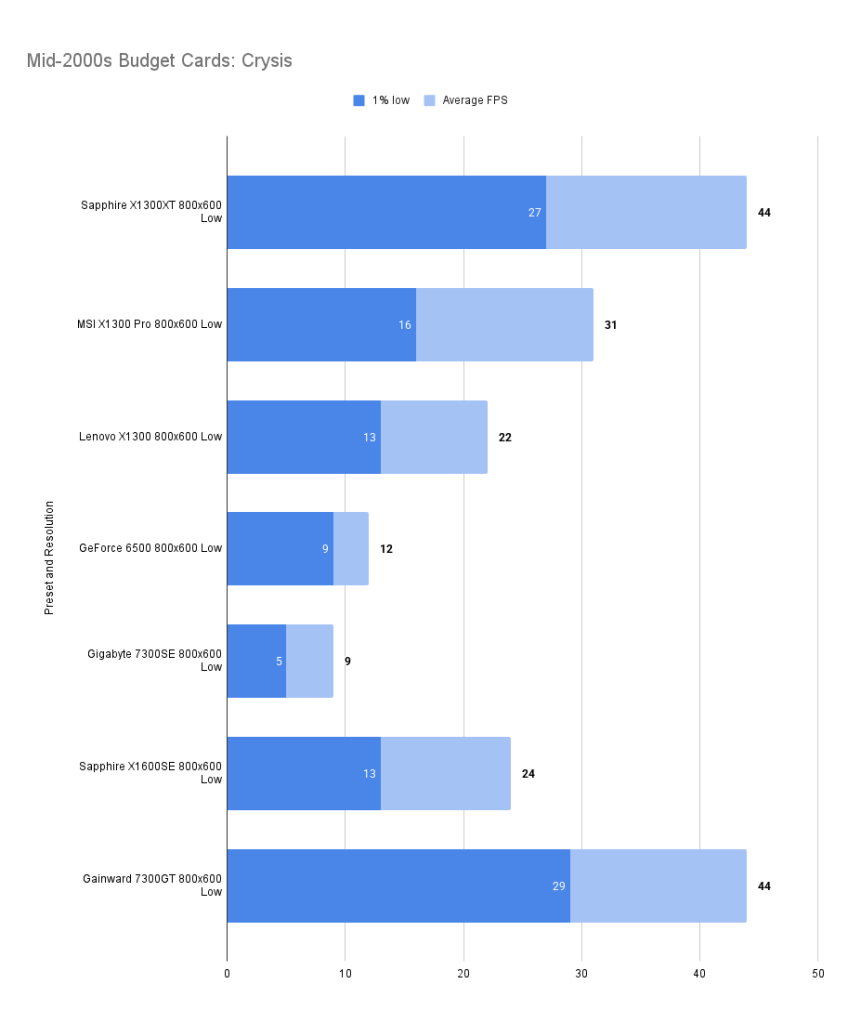
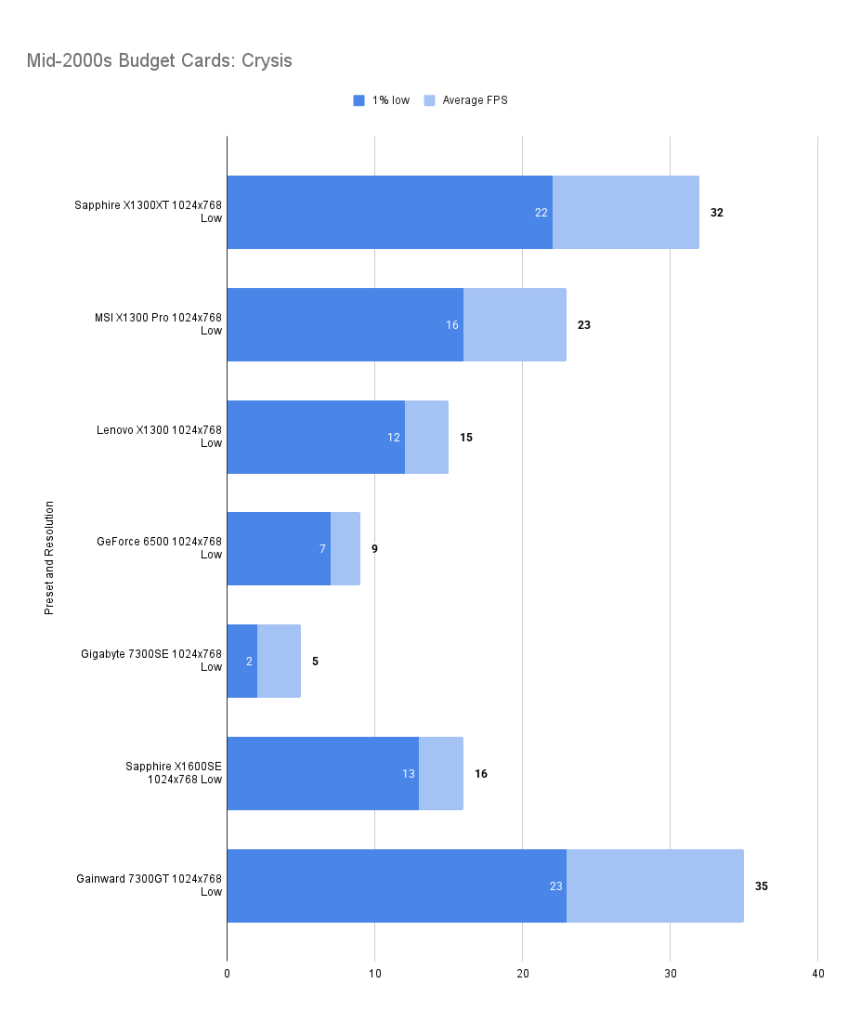
Pushing the resolution up reduces performance and doesn’t look significantly better, the 7300GT does pull ahead though.

Assassin’s Creed (2007)
Minimum: Windows XP/Vista, Dual-core CPU at 2.6 GHz (Pentium D or Athlon 64 X2 3800+), 256 MB GPU (GeForce 6800 or Radeon X1600), 1 GB RAM (2 GB for Vista), DirectX 9.0/10, 12 GB disk space
Recommended: Core 2 Duo at 2.2 GHz or Athlon X2 4400+, 512 MB GPU (GeForce 8800 or Radeon HD 3000 series), 2 GB RAM (3 GB for Vista), same OS and disk space
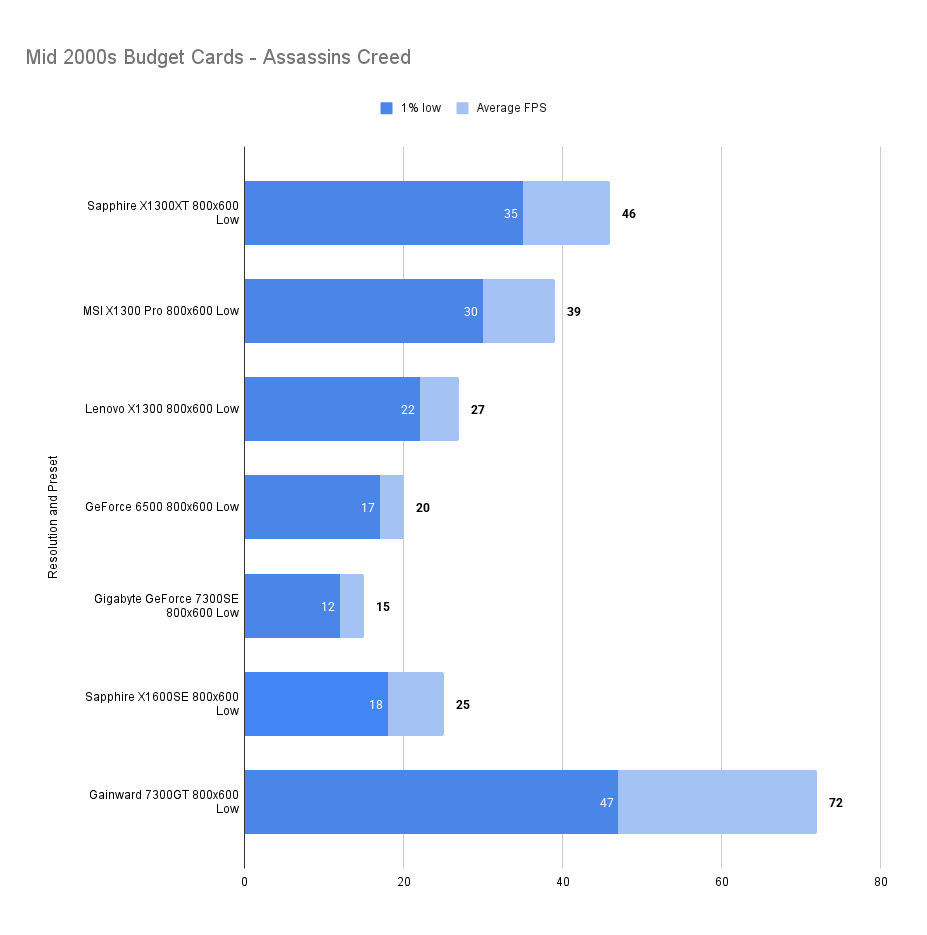
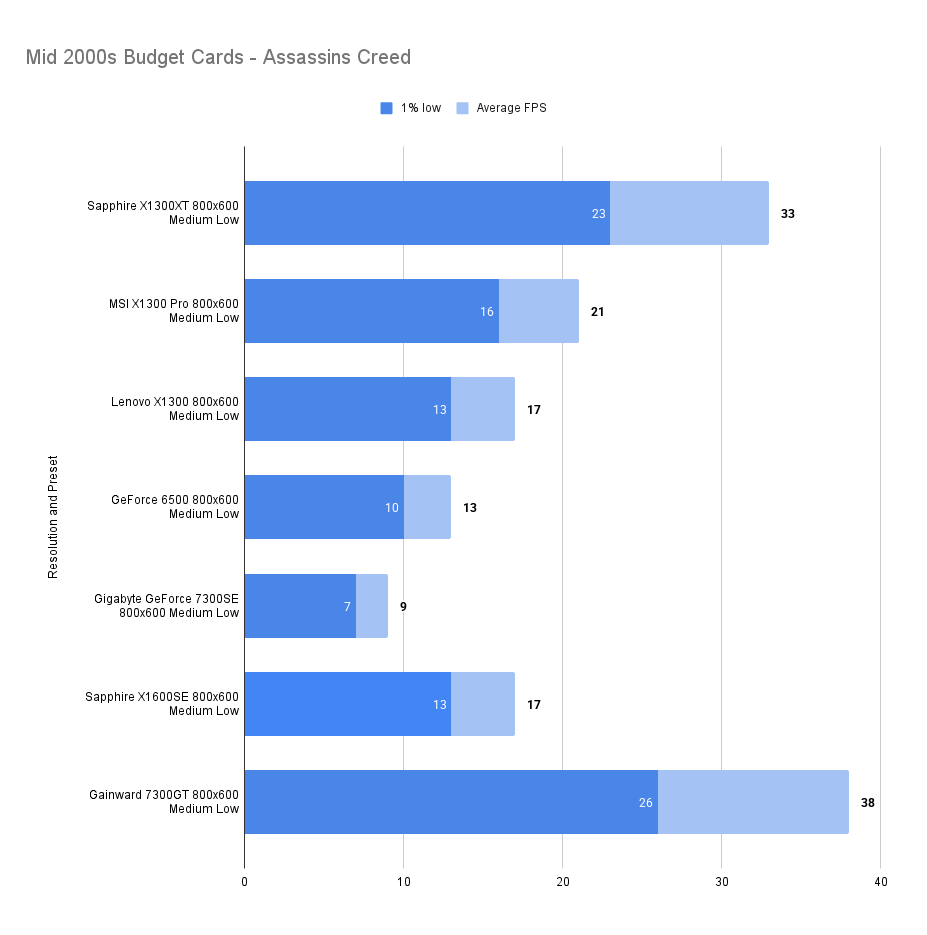
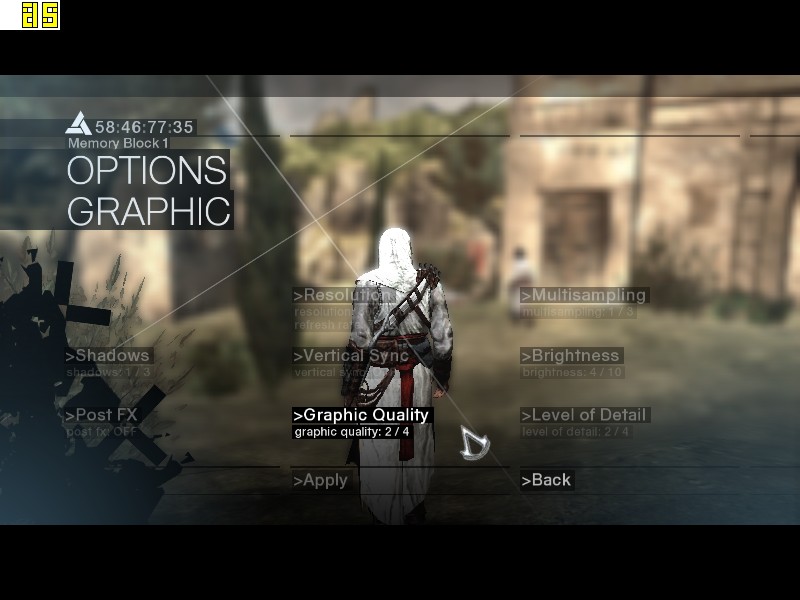
Playable at 800×600 low settings with a useful increase over the X1300Pro. The 7300GT is untouchable here though.
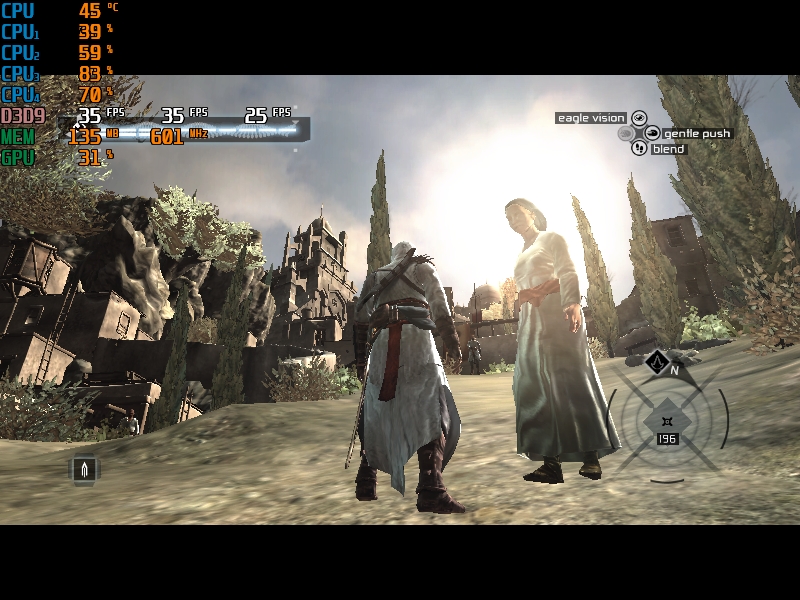
Add in a few more features though and even the 7300GT runs out of steam, our X1300XT has closed the gap significantly. You probably wouldn’t play at these settings though, in fact it’s an ugly game at these low resolutions and feels more sluggish than even the mediocre framerates suggest.

Test Drive Unlimited (2007)

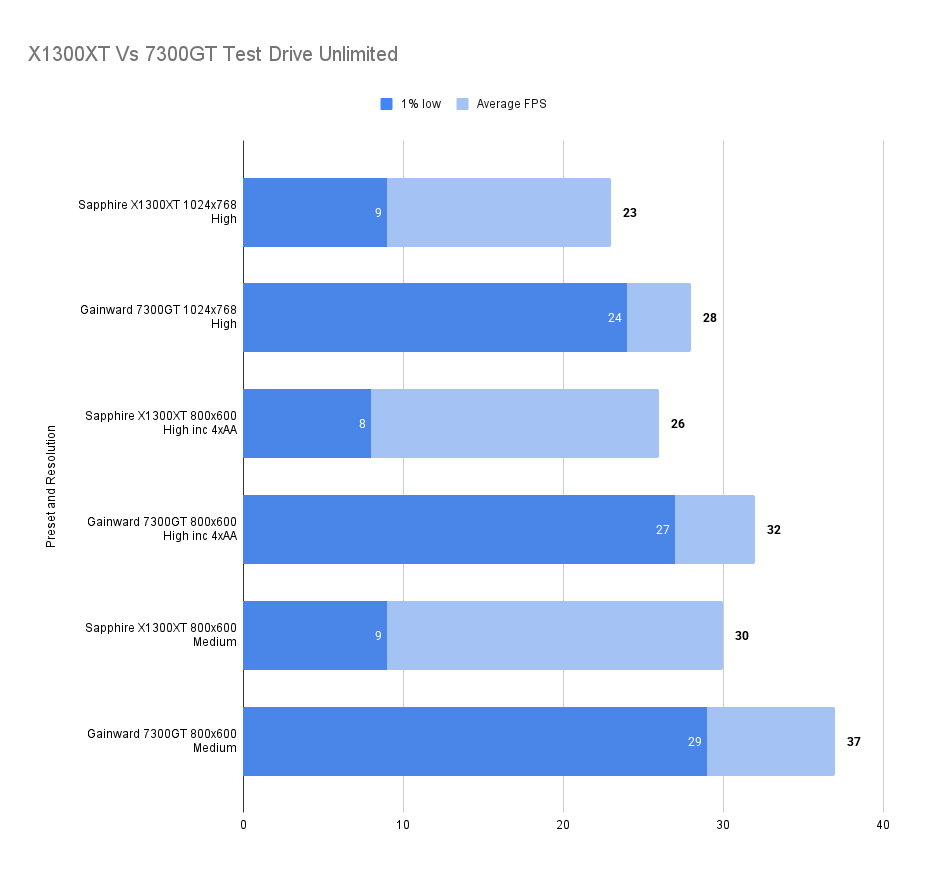
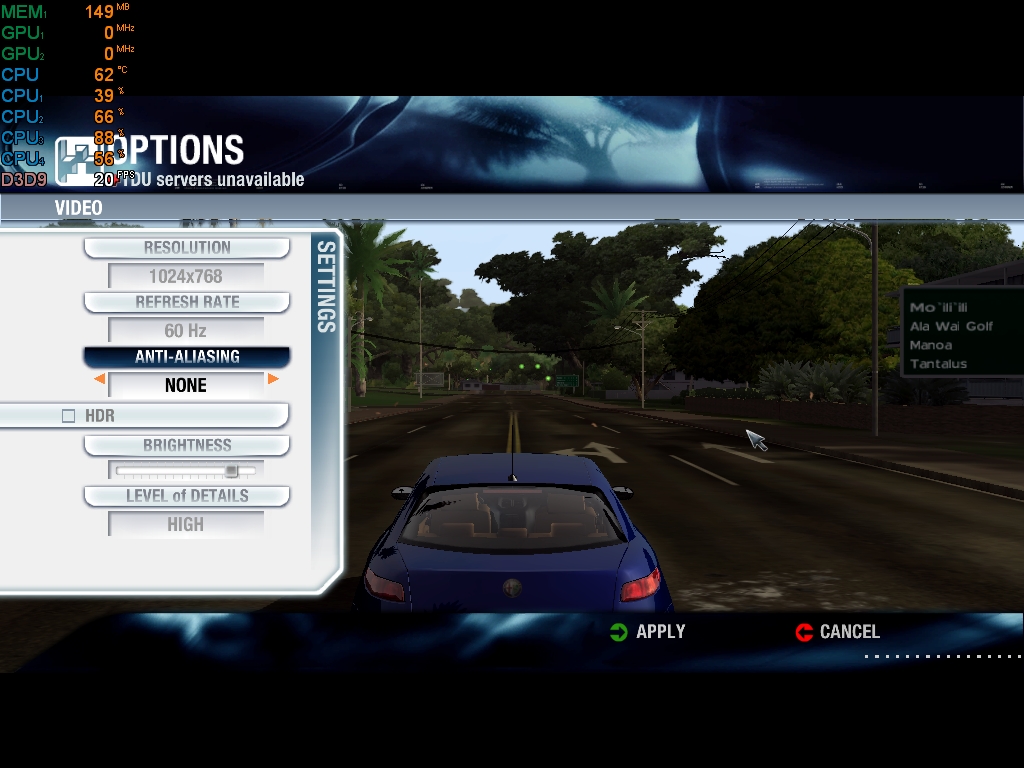
The X1300XT embarrasses itself here — the average framerate is fine, but the 1% low is far worse than the 7300GT. I’ll get the X1300Pro in and update this.
Gaming Summary
In games, the X1300XT gives good performance in titles already out when the card was released. If you’d bought it to play Far Cry, you wouldn’t be disappointed.
Only a few years post‑release though, and you’d be playing at low resolutions and settings. Unsurprising given the rapid pace of technological change — this was the last generation of fixed‑pipeline cards, and unified shaders arrived shortly after.
The 7300GT would be a better choice, but not by as much as I expected going in. The X1300Pro also held its ground admirably.
- UT2003 – Big win for 7300 GT.
- Far Cry – Close win for 7300 GT.
- Doom 3 – Big win for 7300 GT.
- Medieval II: Total War – Close win for 7300 GT.
- FlatOut 2 – Big win for 7300 GT.
- Oblivion – Small win for 7300 GT.
- Just Cause – Small win for 7300 GT.
- S.T.A.L.K.E.R. – Small win for X1300 XT.
- Crysis – Essentially a draw.
- Assassin’s Creed – Big win for 7300 GT.
- Test Drive Unlimited – Big win for 7300 GT.
Synthetic Benchmarks
3d Mark 2001SE
Intro to the software:
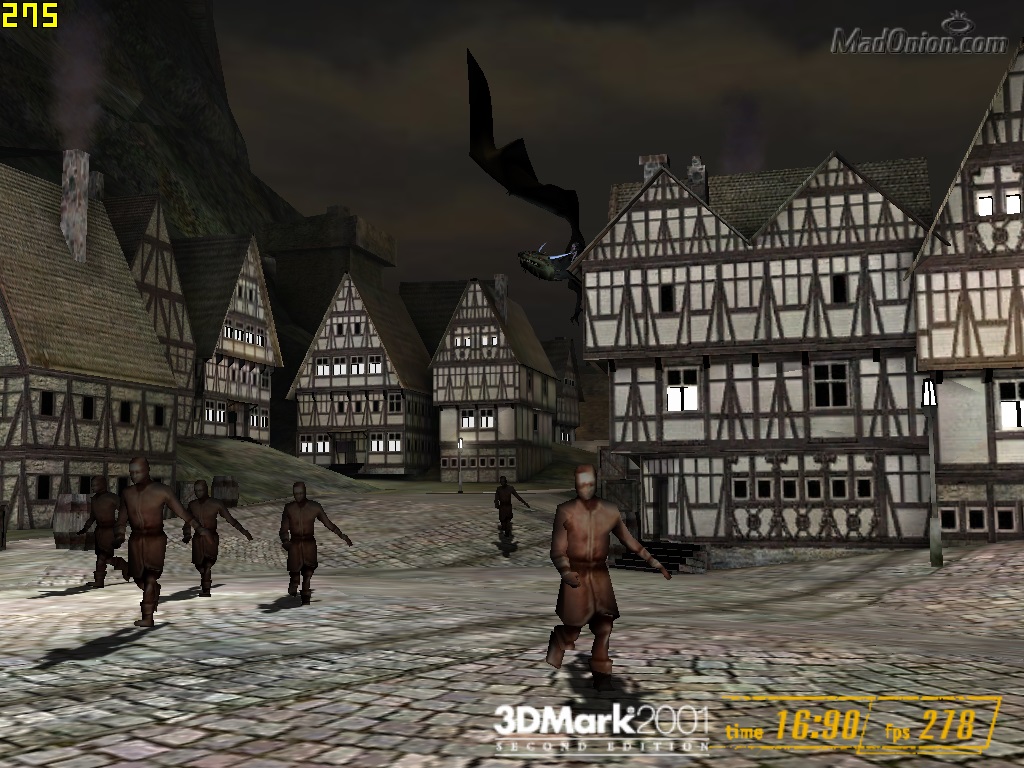
3DMark 2001 SE is a hallmark of early-2000s performance benchmarking, crafted to assess system capabilities in DirectX 8.1 environments. Its suite of synthetic tests—ranging from cinematic scenes like Car Chase and Dragothic to feature-specific shader evaluations—pushed GPUs and CPUs to their limits in a period defined by rapid innovation.
Designed to highlight graphics and processor performance with a focus on vertex and pixel shader throughput, 3DMark 2001 SE delivers a unified score that reflects real-world gaming potential for the era. Systems leveraging hardware-accelerated DX8.1 features, high memory bandwidth, and fast front-side buses typically land at the top of the charts.
Cards such as the ATI Radeon 9700 Pro and GeForce Ti 4600 exemplify peak compatibility, balancing brute force with support for the necessary shader models.
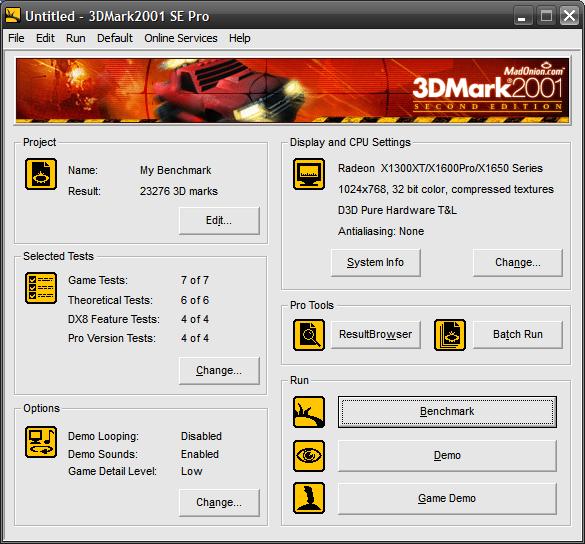
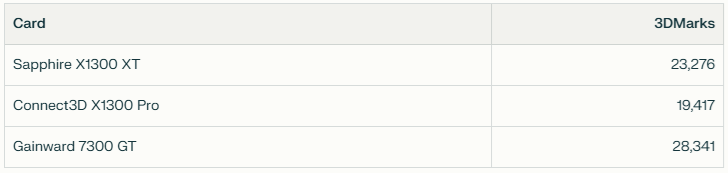
Splitting the difference between the X1300Pro and 7300GT nicely here.
3d Mark 2003
3DMark 2003 marked a major leap in synthetic benchmarking, introducing full support for DirectX 9.0a and a new generation of shader-heavy test scenes. With cinematic sequences like Wings of Fury, Battle of Proxycon, Troll’s Lair, and Mother Nature, it pushed GPU pixel and vertex shader capabilities far beyond the fixed-function pipeline era.
Unlike its predecessor, 3DMark 2003 places greater emphasis on GPU architecture and shader throughput, with CPU tests included for the first time. The scoring system reflects this shift, favoring cards that excel in programmable pipelines and multitexturing performance.
GPUs such as the Radeon 9800 Pro and GeForce FX 5900 Ultra were designed with these workloads in mind, delivering high scores thanks to robust DX9 feature support and ample memory bandwidth.
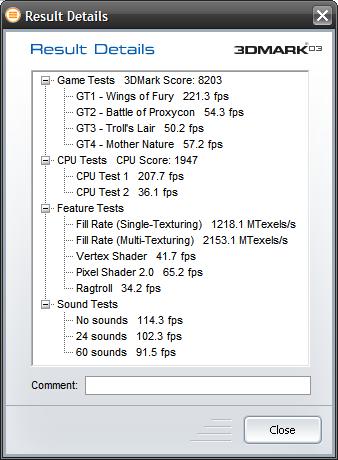
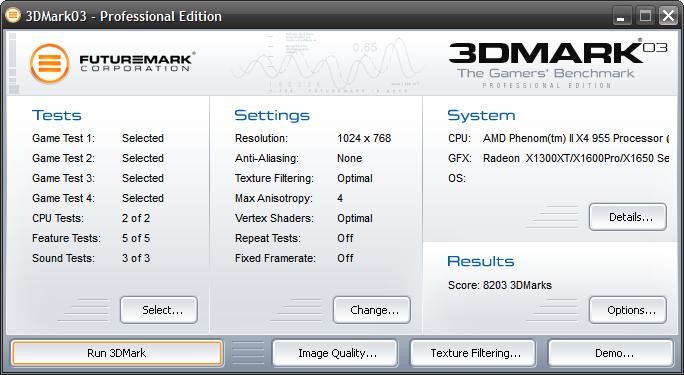
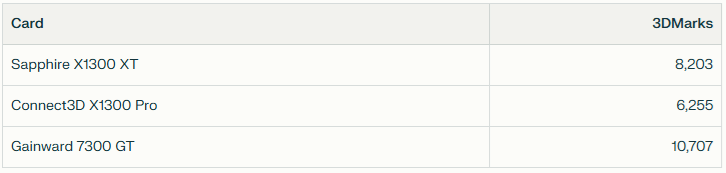
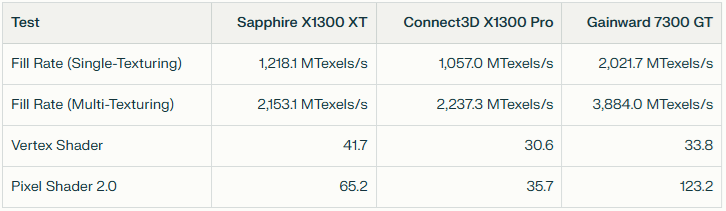
Again we are splitting the difference between X1300Pro and 7300GT.
The Vertex shader score of 41.7 is much higher however, that extra Vertix Pipeline perhaps helping – though it should be noted the X1300pro only has 2 pipelines and competes will with the Nvidia card.
The Pixel shader 2.0 score of the XT is however much lower than the Nvidia card.
3d Mark 2006
3DMark 2006 builds on its predecessors with a more demanding suite of tests that reflect the evolving complexity of DirectX 9.0c-era games. Featuring scenes like Return to Proxycon, Firefly Forest, Canyon Flight, and Deep Freeze, it introduces Shader Model 3.0, HDR rendering, and more intricate lighting and geometry workloads. For the first time, CPU performance is factored into the overall score, acknowledging the growing role of physics and AI in modern gaming.
The benchmark outputs three sub-scores—SM2.0, HDR/SM3.0, and CPU—alongside a unified total. GPUs with robust shader pipelines and support for FP16 textures and blending tend to excel, while older cards may struggle to complete all tests.
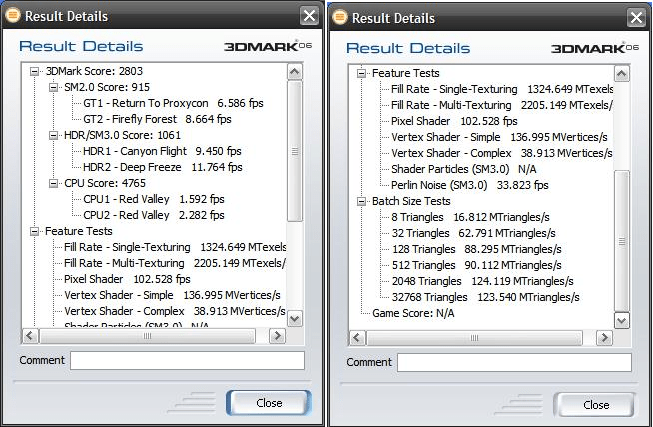
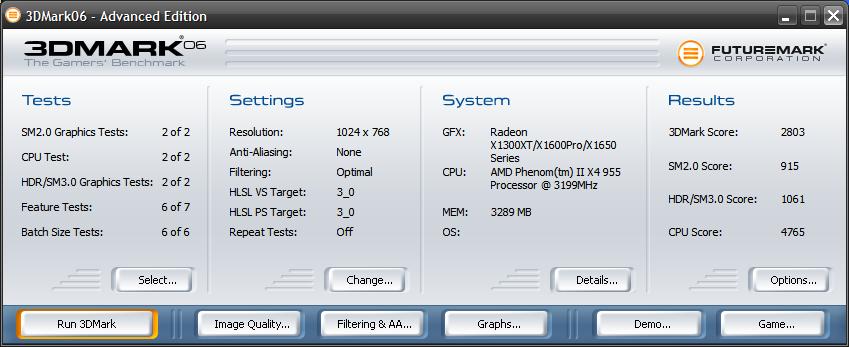
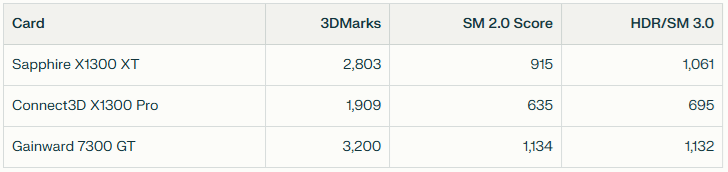
An overall score that is closer to the 7300GT and leaving the X1300pro in the distance. The Shader Model 2 and 3 scores are both closing in on the Nvidia card.
I put the card through F.E.A.R also and found my average
Unigine Sanctuary
Unigine Sanctuary is a visually rich GPU benchmark released in 2007, designed to showcase the capabilities of the Unigine 1 engine. Set in a gothic chapel bathed in torchlight and stained glass, it features dynamic lighting, parallax occlusion mapping, volumetric fog, and ambient occlusion—all rendered in real time using DirectX 9.
Unlike synthetic benchmarks, Sanctuary emphasizes scene fidelity and shader realism over raw frame count. It’s particularly sensitive to fill rate, memory bandwidth, and shader execution efficiency, making it a strong test for mid-2000s GPUs and a punishing one for low-end cards.
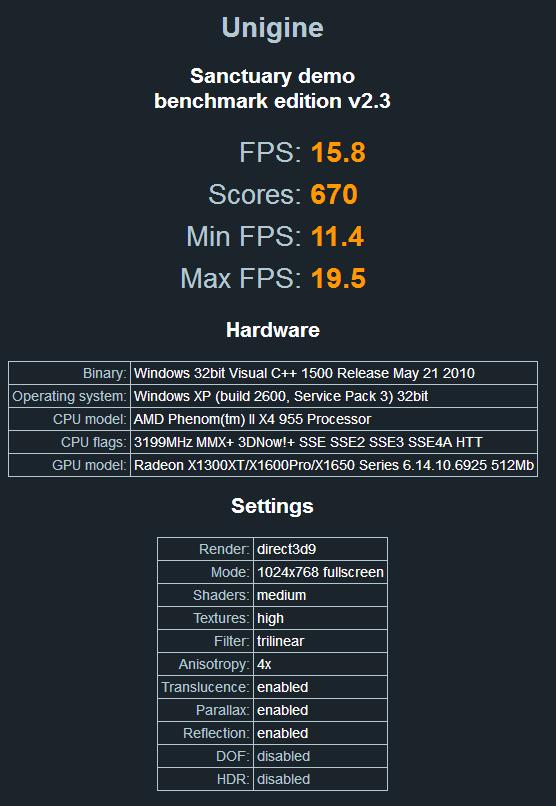
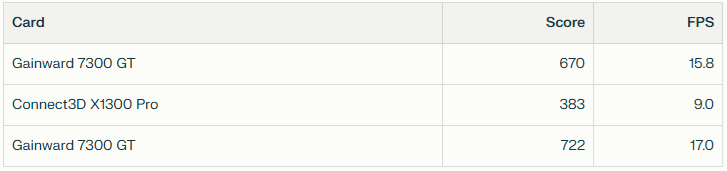
Lagging behind the 7300GT in this test only by a small amount whilst getting well on for double the performance of the X1300pro.
Temperatures
A 20 minute run in Unigine Haven and temperatures sit at 56.8 degrees centigrade on the GPU and 50 degrees on the PCB.
Standard temperature on the GPU is a little over 47 and card on 41 or 42.
The fan speed is reported by GPU-Z as a steady 20% only and it would not increase from this level – definitely a high score here for quiet and cool running.
Tweaktown Article Comparison
Link: Tweaktown X1300XT Roundup
Before wrapping up, I wanted to investigate what a X1300XT could do with faster memory, so I thought I would check out an article from back in the day.
This article has the advantage of testing with 3d Mark 2005 which I hear does not take the CPU into account, so their results should be similar to my results, even though I’m using a much later system.
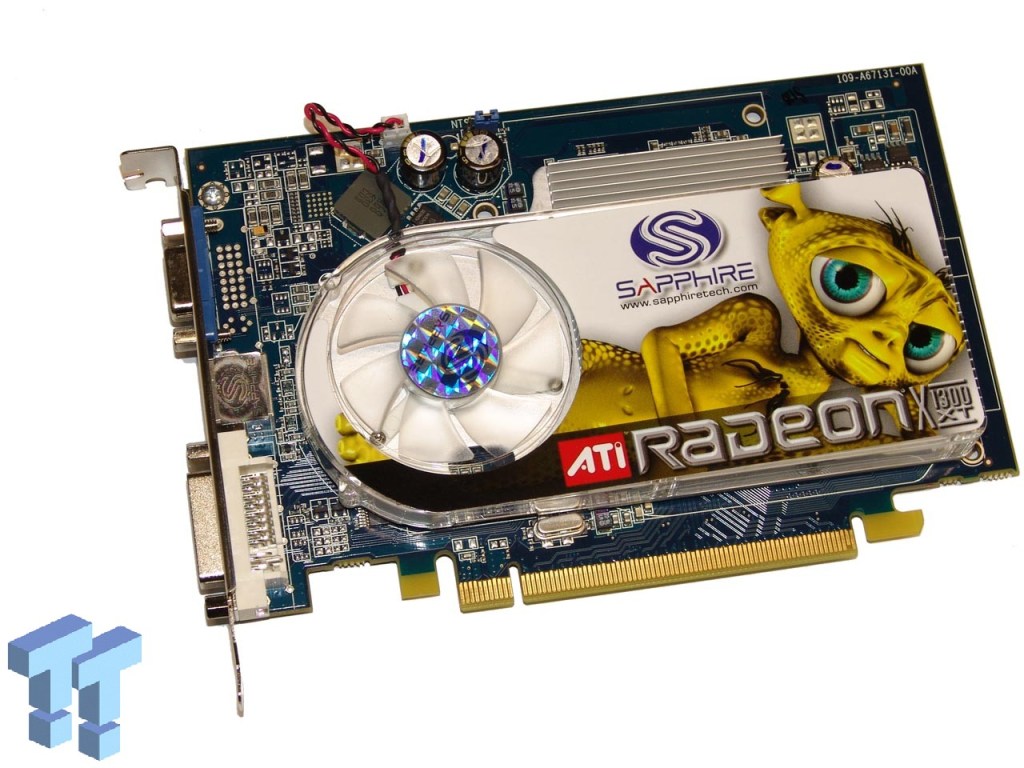
Their Sapphire cards runs at a higher 600Mhz Clock speed and that DDR3 is running at 700Mhz – so the better card for sure.
MSI Afterburner was running as I ran the benchmark and we are topping out at 165Mb or VRAM usage so the 512Mb limit continues to be completely unnecessary.
Their results look like this:
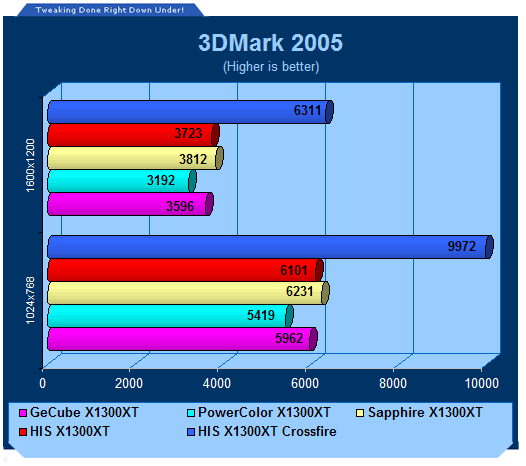
I’m forced to assume that they are using standard settings for their 1280×1024 setting, if they are not then it may explain the lackluster performance of my card, but then there aren’t a great many options available in the software.
So where does my version sit at 1024×768? Drum roll….. 5156 3d Marks. Giving the yellow Alien card a healthy 18.3% advantage over my version.
The stats of their cards and mine for comparison:
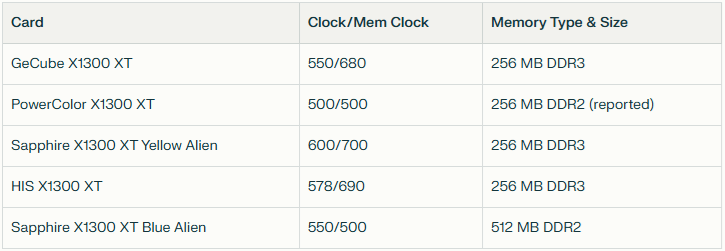
I could accept the loss if all other cards were DDR3 but, my Sapphire card is handily beaten by the lower-clocked Powercolor card, which hardly seems right.
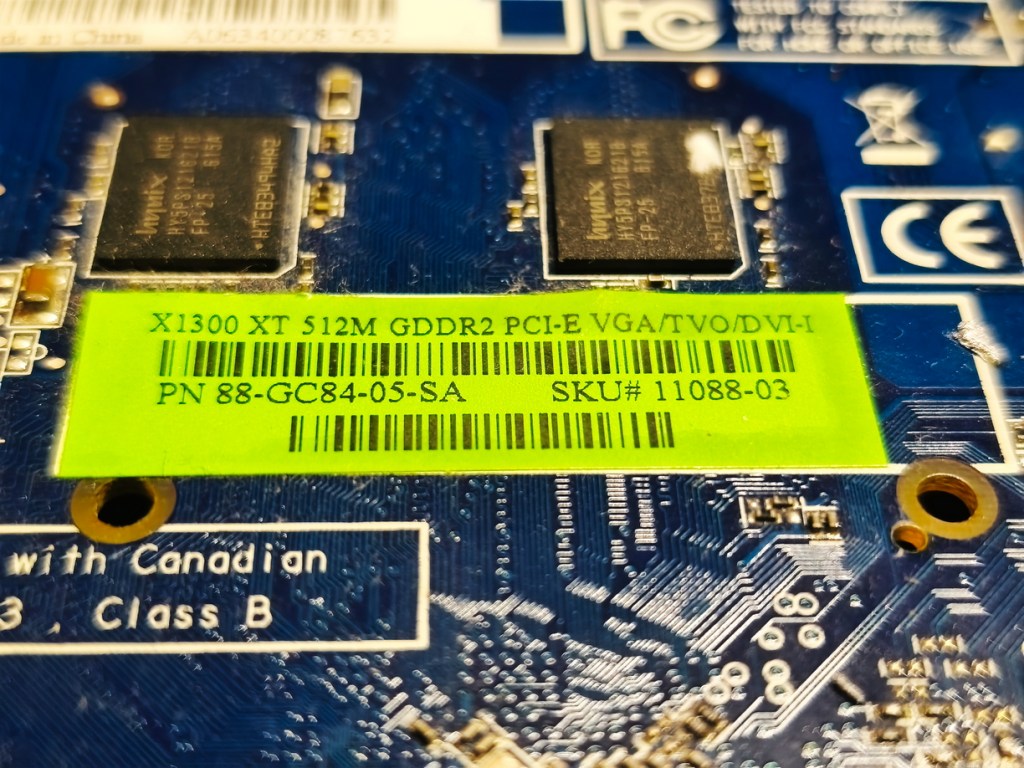
The picture of the box and the sticker on the reverse of the card states DDR3 yet they mention in the article that it’s DDR2. This is weird. To be fair, the lower clock speed does suggest slower DDR2, or very bad DDR3 at best. I do find this strange though, sadly no RAM chips are visible or I’d search for the serial numbers online.
Now to double check things, they also did a 1024×768 test where it clearly says 4xAA and 8xAF so I ran at these settings:
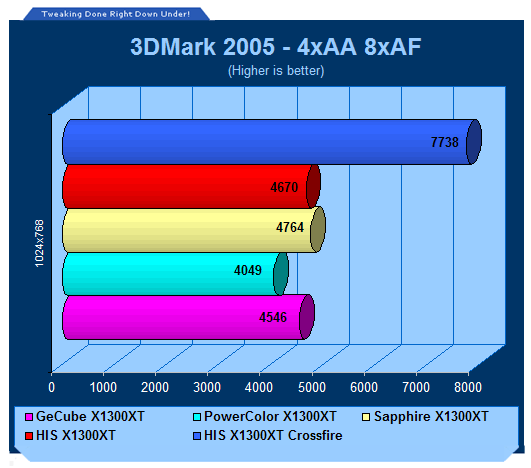
With a max Anistrophic filter at 8AF and And 4xAA, my sapphire card comes in with a score of only 3580 3d Marks still well below the competition.
Another test I replicated was for F.E.A.R.
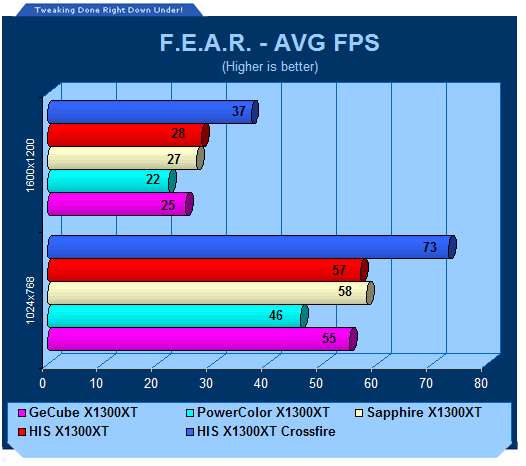
Their cards hit an average of 46 to my average of 26 at 1024×768 but with soft shadows on (a warning comes up that this is a high-end feature)
Turning this feature off and I’m at a more palatable 44Fps (there are no clues about them using this feature on their website).
Clearly, I have much newer drivers than these would have been tested on, perhaps these drivers are tweaked to handle later games at the expense of 2005 era games.
For the FEAR comparison also, they are using a much older Core2Duo E6600 and only 1Gb of RAM. I am also using a more modern version from Good Old Games compared to their unpatched version – so this is not exactly laboratory-grade testing here.
I suspect that all of their cards had DDR3, I’m quite confident my version is running as it should, its cool, it went in without a fuss, DDU was used, not a single crash, artifact, error message or any other indication that things are not as they should be with my card and system.
Conclusions
I like the card, it’s cool and it’s quiet, sets up without fuss, and gives decent performance for a budget card. It looks okay as well, though perhaps lacking a certain something.
It’s a shame the Gainward 7300GT set such a high bar. It was always going to be tough to beat, especially using DDR2 RAM.
The improvement over the X1300Pro wasn’t as big as I expected, but the gulf between the X1300Pro and the other X1300s/7300s was already large.
There’s little reason to seek out your own X1300XT 20 years on, especially not in PCI‑E flavour. Obviously grab an AGP version if you ever see one — it’d work very well in an older Pentium 3/4 system (and slap a heatsink on the bridge chip if you do!).
This was the first time that I tried to replicate results using an article from back in the day – mixed results. They seem to not be very thorough when providing testing conditions and they must have ballsed up their reporting of RAM speeds.
Links
A few relevant articles found are below:
Tweaktown
A roundup of X1300XT’s as referenced earlier:
https://www.tweaktown.com/articles/967/ati_radeon_x1300xt_graphics_cards_compared/index.html
Hexus
A Hexus Review where they put a DDR3 X1300XT up against a DDR2 7300GT and wins hands down in each of the games. From their summary:
https://m.hexus.net/tech/reviews/graphics/6754-radeon-x1300-xt-gddr3-duel-sapphire-vs-gecube/?page=1
First and foremost, the X1300 XT, when coupled with GDDR3, demonstrates itself to be a cut above the GeForce 7300 GT DDR2 in terms of performance. It is consistently faster in all of our tests, handling higher resolutions better than the 7300 GT.
Techpowerup
Another handy win over a 7300GT and a 3d Mark 2005 score much closer to what I had, only a little more.
https://www.techpowerup.com/review/sapphire-x1300xt/
Quote: Compared to NVIDIA’s a bit less expensive 7300 GT, the card is definitely faster, the difference is big enough to be noticed not only in benchmark number but actual gameplay.
NeoSeeker
A Sapphire X1300XT with GDDR3 goes up against a X1300 Pro and a GeForce 6600 with DDR2 RAM
https://www.neoseeker.com/Articles/Hardware/Reviews/sapphire_x1300_xt/
Quote: Sapphire’s X1300 XT is cheap enough to fit into most people’s budgets and performs well enough run today’s games at medium to low resolutions with reasonable graphics quality. Just don’t expect more than what you pay for.
 Ash's Retro Hardware Reviews
Leave a comment