An old office PC from 2008 with a Core 2 Duo and Intel integrated graphics. Who on earth would want one of those in 2026?

Well, apparently I would, as not only do I now own one, I’ve spent actual time benchmarking it and writing this article.
Space is limited in the computer lab/office/fridge/laundry/family dumping zone I operate out of. It’s not exactly the ideal environment for collecting other people’s old computer gear, but here we are.
I wanted a tidy small form factor machine on the desk as a permanent PC with a few games installed. The other systems are always being pulled apart and tested, which is annoying when I want to play a retro game but the Phenom box is halfway through a budget GPU test and can’t run anything properly.
I spotted this machine online for £13 and it seemed to fit the bill perfectly. Postage was about £6, which was impressive given the surprising weight of the thing. Ten kilograms, according to the datasheet I now inexplicably possess.
There are already signs that the machine has lived at least two lives. It was almost certainly an office workhorse originally; I doubt you could walk into a shop and buy one as a consumer.
The owner before me had a working Windows 7 installation on it and a handful of family photos, so it clearly enjoyed a second career as a household PC.
Sadly, it’s very tatty. The marks on the case weren’t obvious in the listing and they don’t scrub off, and the rear panel alignment suggests it has seen some hard years.
Despite all that, £13 for a working machine felt like a bargain, and I was more than happy to give it a third home.

Fujitsu Siemens Esprimo
Esprimo launched under the Fujitsu Siemens Computers brand in the mid‑2000s as a professional notebook line, sitting alongside Lifebook on the mobile/consumer side and Celsius on the workstation end of the catalogue.
After Fujitsu took full control of the PC business, the Esprimo name carried on mainly as the company’s business desktop range.
The modern Fujitsu Esprimo series became a family of business‑class machines built around energy efficiency, quiet operation, and straightforward deployment. They were offered in mini‑PC, small‑form‑factor, micro‑tower, and all‑in‑one designs.
Esprimo systems were aimed squarely at corporate, public‑sector, and education environments where reliability, low power draw, and predictable lifecycle costs mattered far more than gaming performance or enthusiast features.
It appears the Esprimo brand has now faded away. The last press release I can find dates to 2020, and the newest processor generation I’ve seen in an Esprimo is 9th‑gen Intel. These later machines were significantly smaller and came in well under the ten kilograms of the model featured here.
Zero-Watt Technology
According to the below article:
https://www.itpro.com/610063/fujitsu-siemens-reveals-zero-watt-pcs
Fujitsu was really pushing the green angle around the time this machine was made. The big claim was that, when put into hibernation, their PCs would use absolutely no power at all. They even said the system could still be set to wake automatically via LAN for overnight updates, which sounded like a neat trick for big organisations trying to keep fleets patched without leaving everything idling.
The same reporting mentioned that the power supply was rated at 89% efficiency. For a small form factor machine, that’s genuinely useful. SFF systems often end up with mediocre PSUs that run hot, waste energy, and eventually give up, so an efficient unit was a real selling point.
Maybe that’s one of the reasons to pick a Fujitsu business desktop over the endless Dell Optiplexes that seem to multiply in the wild. Fujitsu clearly cared about the environmental angle, and some of that engineering attention shows through even in a battered old example like this one.
I’m testing the zero‑watt technology right now as I type this. The machine is hibernating. It dropped to about 7 watts for the first minute, then settled at 1 watt.
A single watt isn’t going to bother anyone, but it’s not zero, so the party trick doesn’t really work.
It wouldn’t wake up either. No amount of bashing the keyboard (PS/2) or mouse (USB) brought it back to life. The power button did, but then it got stuck at the first POST screen. I had to do a long press to force a fresh boot into Windows, so that little experiment was a dismal failure.
The Restoration
Despite the battered exterior, the inside isn’t too bad at all. It must have been opened at some point since 2008, because otherwise there would have been far more dust. Maybe the lack of an inlet fan helped a bit, but there’s certainly no dust protection anywhere, so unless it lived in a lab or some other clean environment, it’s unlikely to have stayed this tidy on its own.
Getting into the thing is a bit of a surprise. The case comes off over the front rather than the back, which is not what you’d expect just by looking at it. You push in the two side buttons, pull the whole front section forward, and then give the machine a fairly confident thump onto the desk to free it. It’s not the gentlest procedure, and probably explains why this particular example looks so battered. Maybe when it was shiny and new everything came apart more gracefully.
Inside, there’s no ducting and none of the airflow tricks you see in old Dells. The heatsink and fan come off easily, and underneath the thermal paste was fine — a bit dry, but it wiped away with isopropyl alcohol and I replaced it with some fresh TF4.

The machine arrived with a single 2GB stick of RAM, which meant it was running in single‑channel mode. Most readers will know that systems of this era really ought to run with two matching sticks so the processor has double the memory bandwidth.
A quick check of the spec sheet confirmed that this is how it was sold. It’s pretty poor form for Fujitsu to handicap the machine like that.

I debated leaving it as‑is for authenticity, but eventually dropped in a pair of matching 2GB Crucial sticks. DDR2 is dirt cheap, and it’s an easy upgrade for anyone. I ran a few before‑and‑after tests to show the difference.
I decided to leave the hard disk alone rather than replace it with an SSD, which would normally be the first thing to do. I wanted to see how much difference it made to loading times to go back to a mechanical drive. Cloning the installation to a similar‑sized SSD would be trivial if needed.

I wanted to add a new fan somewhere to improve airflow, but sadly it wasn’t to be. There’s no space for anything, not even a 40mm unit at the back.
So the system is left with the CPU fan blowing forward into a single outlet through the front panel. Fine. I’ll keep an eye on the thermals.
The machine does come with Intel integrated graphics, and I did want to see what that was all about. But the plan was also to install the boxed MSI RX2400Pro I’ve had for years. It’s the fastest low‑profile card I own, or at least I think it is.

Intel Q45 Integrated Graphics (Intel GMA 4500)
Early Intel integrated graphics have a well‑earned reputation for poor performance, a reputation they carried right through to the early 2010s before Sandy Bridge finally dragged things into respectability.

This machine predates the era of iGPUs living inside the processor. Graphics here are still done the traditional way, via the chipset. The Esprimo E7935 E‑Star4 uses the fuller‑featured Q45 rather than the cut‑down Q43, which makes it a little more interesting. Q45 even supports DDR3, although the board offers no DDR3‑shaped slots, so that theoretical advantage goes unused.
The GMA4500 integrated into the Q45 does at least have a few features that look decent on paper:
- DX10 support
- Shader Model 4.0
- OpenGL 2.0
It still uses system RAM, of course, so it’s a shame DDR3 isn’t available. Faster memory might have helped it push a few more frames.
GPU‑Z reports ten unified shaders but no clock speed, along with four ROPs and four TMUs. There’s a small control panel for graphics settings, but it’s very limited. I nudged the 3D preference up to performance, naturally.

There were optional graphics cards available when buying this machine, though nothing particularly high‑end. That’s not surprising given the size of the proprietary power supply. A low‑profile 9500GS would be a nice period‑correct upgrade if I ever find one. I’ll keep an eye out.


There were some optional graphics cards that could have been specified when buying this machine, nothing particularly ‘high end’ but that shouldn’t be surprising considering the size of the proprietary power supply:

Still a low profile 9500GS would be nice if I could find one.. I’ll keep my eye out.
Core 2 Duo 8400
All C2D processors have a great reputation for efficient performance after the disastrous Pentium 4 years.
A list of processors that could have been purchased in this system is below, as you can see we did averagely well with our mid-table E8400.


I do wonder how the cooling setup would cope with one of the 95‑watt parts. The 95‑watt Phenom II I have kicks out a lot of heat, and this little Fujitsu doesn’t exactly have airflow to spare. With only a single fan pushing air forward and out through the front panel, a hotter chip would probably make the whole thing sweat, coupled with a discrete GPU also.. thermals would almost certainly become a problem.
The cache figures shown in the table refer to Level 2 cache. AMD’s Phenom line of the same era also included Level 3, but that mainly helped in heavier multi‑threaded workloads, which weren’t especially common in 2008.
In practice, the stronger per‑core performance of the Core 2 processors often mattered more than extra cores or extra cache. That was usually the deciding factor in real‑world workloads of the time.

Cool(ish) air gets dragged over the chipset by the CPU cooler and then pushed out of the front, so the airflow does at least pass over the chipset heatsink on its way through the machine.
It’s not a bad layout, considering the size of the machine, but I’d still have preferred a fan pulling air in from the back. That would have made the whole setup feel a bit less like the CPU is doing all the heavy lifting on its own.
CPU Benchmarks
I haven’t done a lot of CPU testing before and, to see how they perform in games, I’d need to compare this against a more modern and powerful CPU, which probably isn’t going to happen in this case.
The CPU‑Z benchmark results are off. It should perform much better. When running the benchmark, Task Manager doesn’t show 100% utilisation, but when running Stress CPU it does. Clearly a CPU‑Z problem, but I couldn’t find a solution..

Clearly a CPU-Z problem but I couldn’t find a solution.
Cinebench 2003 is better though. Those results match closely with what people have posted online.

Finally, Crystalmark, again scores around what can be expected:

I’ll run these tests on some other systems and update this article so we have some more points of reference.
Game Benchmarks
I wasn’t expecting much from the integrated Intel graphics. They were known for absolutely woeful performance until the Ivy Bridge generation finally dragged things into respectability.
Still, as I’ve found when testing old AMD APUs, lacklustre performance at launch doesn’t automatically mean that games released years earlier can’t be enjoyed decades later. That’s one of the fun parts of the hobby: discovering that hardware once dismissed as hopeless can still run older titles perfectly well long after its intended era has passed.

Tom Clancy’s Splinter Cell (2002)
Game Overview:
Tom Clancy’s Splinter Cell launched on November 19, 2002, developed by Ubi Soft Montreal. Built on the LithTech Jupiter engine (Unreal Engine precursor), it pioneered tactical stealth gameplay with groundbreaking light/shadow mechanics and realistic audio design. The game set new standards for immersion through dynamic lighting where visibility literally shaped gameplay.
Known for its revolutionary light-based stealth, Splinter Cell remains the ultimate benchmark for early 2000s GPUs. The game’s real-time shadows, particle effects, and high-poly environments brutally stress fillrate and shader performance even on modern retro hardware.
I have the GOG version of the game which has an internal benchmark that can be used.

Performance Notes:
First up then, the original Splinter cell, the game is playable, no doubts there. You’ll probably have to reduce the settings to medium though.
Performance is somewhat behind the X1300Pro and remains so at all resolutions.

Unreal Tournament 2003 (2002)
Game Overview:
Released in October 2002, Unreal Tournament 2003 was built on the early version of Unreal Engine 2. It was a big leap forward from the original UT, with improved visuals, ragdoll physics, and faster-paced gameplay.
The engine used DirectX 8.1 and introduced support for pixel shaders, dynamic lighting, and high-res textures all of which made it a solid test title for early 2000s hardware.
Still a great game and well worth going back to, even if you’re mostly limited to bot matches these days. There’s even a single-player campaign of sorts, though it’s really just a ladder of bot battles.
The game holds up visually and mechanically, and it’s a good one to throw into the testing suite for older cards. The uncapped frames are pretty useful (and annoyingly rare) on these old titles.
I play a full match of DM Plunge for each run, not exactly replicable as every match will be different but the length of the match means a lot of data is collected and the average should be pretty reliable.

Performance Notes:
In UT2003 the GMA 4500 is well down the bottom end of things, beating the 7300SE handily but falling well short of the X1300Pro.
Playable though, even at these max settings, not bad at all really, for how good it looks UT2003 is so well optimised for any hardware, love it.

X2: The Threat (2003)
Game Overview:
Released for Windows in December 2003, with later ports to Mac OS X and Linux, X2: The Threat is a space trading and combat simulation developed by Egosoft. It continues the story from X: Beyond the Frontier, placing players in the role of Julian Gardna, a former pirate drawn into a conflict with a new alien threat known as the Khaak
While not tied to a widely licensed engine like Unreal, X2 introduced a new in‑house graphics engine built specifically for the X‑Universe. This engine delivered Improved ship and station models, More detailed sectors with nebulae and environmental effects, Dynamic lighting and particle effects and Support for DirectX 8.1‑class hardware, aligning it with early‑2000s GPU capabilities.
This made X2 a solid benchmark title for PCs of the era, especially for players testing mid‑range and high‑end GPUs from the GeForce 3/4 and Radeon 8500/9000 families.
This is the GOG version again and it does have an internal benchmark.

Performance Notes:
Another early title so the settings are pushed right up for mid-2000’s hardware. This only allows for an average framerate of 28.3 fps so not at all playable at this resolution and settings.
You’d be dropping down to 800×600 I suspect to get this close to playable.
AA is apparently on in the benchmark but, I have my doubts as you’ll see later.

FarCry (2004)
Game Overview:
Far Cry launched in March 2004, developed by Crytek and built on the original CryEngine. It was a technical marvel at the time, with massive outdoor environments, dynamic lighting, and advanced AI. The game leaned heavily on pixel shaders and draw distance, making it a solid stress test for mid-2000s GPUs. It also laid the groundwork for what would later become the Crysis legacy.
I use HardwareOC FarCry Benchmark to get these results with three runs at each setting.

Performance Notes:
FarCry next and it is playable at minimum quality which doesn’t really look that bad.
1024×768 at minimum settings can allow around 64fps, well under the X1300Pro but still very playable.

Ultra settings though.. you can forget, almost playable at 800×600 but any higher and you’re in for a dissapointing time.

And with AA enabled? I wouldn’t know, it would crash every time.
Doom 3 (2004)
Game Overview:
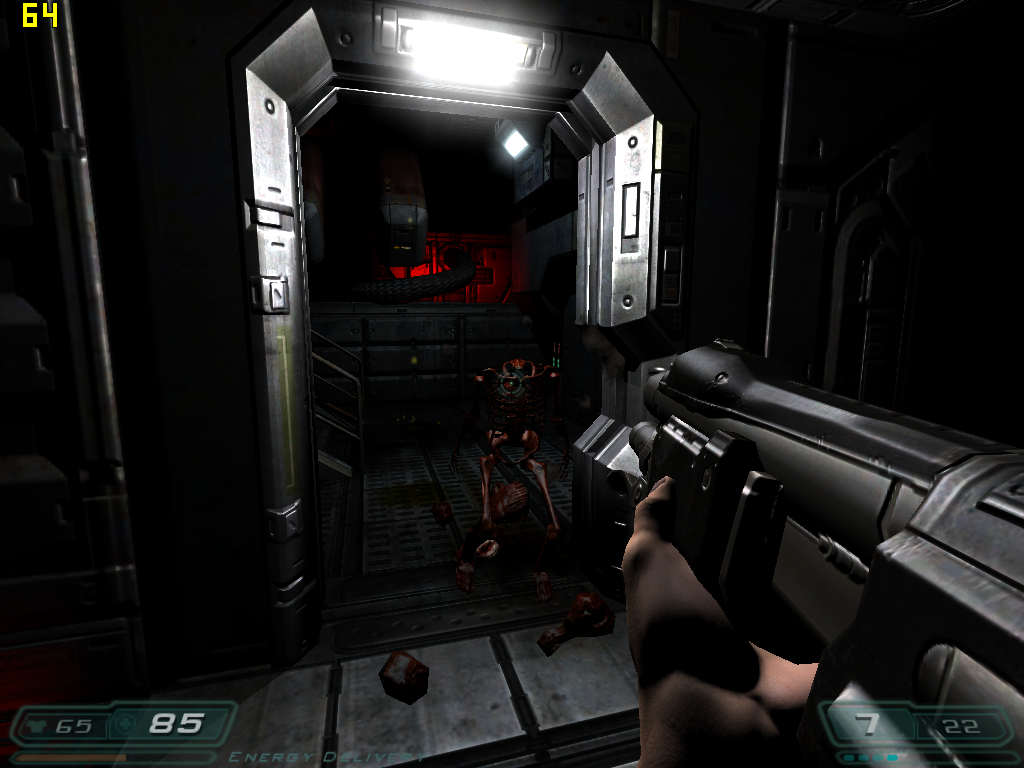
Released in August 2004, Doom 3 was built on id Tech 4 and took the series in a darker, slower direction. It’s more horror than run-and-gun, with tight corridors, dynamic shadows, and a heavy focus on atmosphere. The engine introduced unified lighting and per-pixel effects, which made it a demanding title for its time, and still a good one to test mid-2000s hardware.
The game engine is limited to 60 FPS, but it includes an in-game benchmark that can be used for testing that doesn’t have this limit.
Performance Notes:
At High settings with the timedemo, an average of 24 fps can be found.
You would need to drop down a resolution and to minimum settings to get this playable on the GMA4500.

When changing settings in Doom3 you need a restart. Selecting AA and restarting and AA remains off and the resolution is defaulted to 640×480.
No amount of fiddling seems to change this, this GMA 4500 does not seem to like Anti-Aliasing in this title either.
F.E.A.R. (2005)
Game Overview:
F.E.A.R. (First Encounter Assault Recon) launched on October 17, 2005 for Windows, developed by Monolith Productions. Built on the LithTech Jupiter EX engine, it was a technical showcase for dynamic lighting, volumetric effects, and intelligent enemy AI. The game blended tactical first‑person gunplay, horror elements, and cinematic slow‑motion combat, creating an experience that stood out sharply from other shooters of the era.
The engine supported per‑pixel lighting, soft shadows, volumetric fog, and advanced particle effects, all of which pushed mid‑2000s hardware hard, especially when maximum shadow quality was enabled. F.E.A.R. became a popular benchmark title thanks to its combination of heavy GPU lighting workloads and CPU‑intensive AI routines, which were among the most advanced in any shooter at the time.

Things are getting quite desperate now, at F.E.A.R Max Settings the GMA4500 can only give a 10FPS average with a 6fps minimum FPS.

Anti‑aliasing enabled posts the exact same result, even after a few retests as the non AA result which was highly suspicious!
I am assuming that it just doesn’t work.
selecting everything to minimum and there is a minimum FPS of 57 and an average of 139 at 640×480, so playable on this system – looks like crap though.
Battlefield 2 (2005)
Game Overview:
Battlefield 2 launched on June 21, 2005, developed by DICE and published by EA. It was a major evolution for the franchise, introducing modern warfare, class-based combat, and large-scale multiplayer battles with up to 64 players. Built on the Refractor 2 engine, it featured dynamic lighting, physics-based ragdolls, and destructible environments that pushed mid-2000s hardware.

Performance Notes
The standard settings that I have been using for benchmarking is not kind to the GMA4500. 26Fps isn’t a total sideshow but the game will only really be playable at a lower resolution and settings.


Need for Speed: Carbon (2006)
Game Overview:
Need for Speed: Carbon released on October 31, 2006, developed by EA Black Box and published by Electronic Arts. It continued the street‑racing direction established by Underground and Most Wanted, shifting the series toward canyon duels, crew‑based racing, and a darker, more stylised presentation. Built on an enhanced version of the EAGL engine, it featured motion‑blur effects, HDR‑style lighting, depth‑of‑field, and detailed night‑time environments that pushed mid‑2000s GPUs far harder than earlier entries. Its mix of open‑city racing and narrow mountain passes made it a demanding benchmark for lower‑end hardware, especially when post‑processing and texture quality were set high.

Performance Notes:
The minimum settings that I usually test at are 800×600 with the medium preset.
As you can see this was not a success, perhaps 640×480 low can make things playable but what would be the point in that?

Medieval II: Total War (2006)
Game Overview:
Released on 10 November 2006, Medieval II: Total War was developed by Creative Assembly and published by Sega. It’s the fourth entry in the Total War series, built on the enhanced Total War engine with support for Shader Model 2.0 and 3.0. The game blends turn-based strategy with real-time battles, set during the High Middle Ages, and includes historical scenarios like Agincourt.
I run the intro to the Agincourt battle, this is in-engine so does render as if you are playing the game and will give like-for-like results in all scenarios.

Performance Notes:
Medium settings gives 20fps at 1024×768, the lowest resolution that the game allows.
You’d get a few more frames with the Low preset but I can’t imagine it being a very fun experience as the 1% low is a lot lower than this average framerate.


The Elder Scrolls IV: Oblivion
Game Overview:
Oblivion launched on March 20, 2006, developed by Bethesda Game Studios. Built on the Gamebryo engine, it introduced a vast open world, dynamic weather, and real-time lighting. The game was a technical leap for RPGs, with detailed environments and extensive mod support that kept it alive well beyond its release window (it’s just had a re-release recently).
Known for its sprawling world, Oblivion remains a benchmark title for mid-2000s hardware. The game’s reliance on draw distance and lighting effects makes GPUs struggle.
The benchmark run involves a run to the top of the hill opposite the sewer entrance, killing the two bandits on the way. The weapon is kept out for the duration (which costs about 5fps if you can believe it).

Performance Notes:
Only 20fps at 800×600 Low settings, I’m officially declaring this unplayable.

Test Drive Unlimited (2006)
Game Overview:
Released on September 5, 2006, Test Drive Unlimited was developed by Eden Games and published by Atari. It marked a major technical leap for the Test Drive franchise, built on the proprietary Twilight Engine, which supported streaming open-world assets, real-time weather, and Shader Model 3.0 effects. The game ran on DirectX 9, with enhanced support for HDR lighting and dynamic shadows, optimized for both PC and seventh-gen consoles.
At launch, TDU was praised for its ambitious scale, vehicle fidelity, and online integration, though some critics noted AI quirks, limited damage modelling, and performance bottlenecks on lower-end rigs. The PC version especially benefited from community mods and unofficial patches that expanded car libraries and improved stability.
I do a high speed run up and down the same streets in a loop for each run, traffic density is medium but still will add an element of randomness but it still gives a good reflection of the performance you can expect.

Performance Notes:
I wanted to test the 2006 games but no further so driving up and down in Test Drive unlimited at a stutter framerate was the last unpleasant experience, that’s quite enough.

Lets not forget, the actual chipset was made in 2008, so these games predate it by two years.
Synthetic Benchmarks
3d Mark 2000
I could not get 3d Mark 2000 to install and run on the machine, no error or anything, just a general refusal to acknowledge that I was trying to run the executable.
3d Mark 2001SE
53% beneath the X1300 Pro, comparable with the Geforce 7300SE in this test

3d Mark 2003
53.6% behind the X1300 pro in this one, I’m seeing a pattern develop here, the lead over the 7300SE is improving though.

3d Mark 2006
32% slower than the X1300Pro in this one, the margin is reduced in the 2006 version, SM3.0 performance perhaps a little better on the GMA graphicsd

Unigine Sanctuary
Unigine Sanctuary was the one surprise. The GMA 4500 actually beats the X1300 Pro here, scoring 430 against 383. It’s only a small win, but still unexpected given how badly Intel’s integrated graphics usually do in older benchmarks.
The Sanctuary result makes more sense once you remember the two GPUs were tested in completely different systems. The X1300 Pro was running in a Phenom II X4 955, while the GMA 4500 is tied to the Core 2 Duo platform.
Sanctuary is quite CPU‑heavy for its age, and it seems to lean more on the CPU than the older 3DMarks do. So it’s possible the stronger Phenom II didn’t help the X1300 Pro as much as we’ve come to expect, while the Core 2 Duo happened to pair better with the Intel graphics in this particular test.
It’s only a theory, but it might explain why the GMA 4500 edges ahead here when it loses everywhere else.
I did retest with a result of 432 so actually a slightly increased lead, strange.

Power & Heat
The system only pulls 56 W from the wall while running Unigine Sanctuary, which suggests the benchmark is heavily GPU‑limited. Using the CPU‑Z stress test alone, it draws around 59 W and won’t go any higher.
To push things to the absolute limit, I ran the CPU‑Z stress test and Sanctuary at the same time. With both the CPU and GPU sitting at 100 % utilisation, the system reached a steady 68 W.
So in every case there’s plenty of overhead from the 250 W power supply.
As expected, there’s no GPU temperature sensor, but even with both tests running together the CPU never went above a peak of 39 °C. The case design clearly handles the stock setup without any trouble at all.
A stable 29w is shown at idle.
Summary and Conclusion
adly, I don’t think this one fits the original plan. The case is just too beaten up and scratched to have a permanent place in the office, and I’ve no idea how you’d ever get it looking factory fresh again.
The internals, though, aren’t bad at all.
The Core 2 Duo deserves its reputation. It runs cool, quiet, and barely sips power even when pushed. The integrated GMA 4500 graphics were interesting to test, but they definitely earned their reputation as a display adaptor and not much else. The lack of anti‑aliasing support doesn’t really matter anyway — there’s no performance spare for such eye candy.
A discrete GPU is clearly needed, and the good news is the power supply has plenty of overhead. The rest of the system uses so little energy that any low‑profile card without an external power connector should be fine. There’s even space for a bulkier card thanks to the lack of plastic ducting you’d normally see in a Dell of this era.
Thermals look good too. The CPU wouldn’t even hit 40 degrees, so there’s room to play with. I don’t feel any need to upgrade to a more powerful 95 W CPU; it would just add heat while most GPUs will be the limiting factor anyway. It would still be interesting to see how a passively cooled GPU affects things, and whether the lack of an inlet fan finally becomes a problem.
Getting into the case does get easier once you know the trick, but it’s hardly satisfying. I’m not a huge fan of tool‑less designs anyway — just put a few screws in the back. Maybe that’s because I’m surrounded by tools here and not trying to fix something at someone’s desk.
I’ll add a low‑profile card, maybe even find a Fujitsu OEM option to make this as good as it can be. Then I’ll write up its own article and see what effect it has on the system. At least let’s improve it a bit before consigning it to the loft.
The search for a tidy SFF PC goes on. I’d happily settle for a clean, unscathed version of this one.
Also, I’m happy to have documented the GMA 4500 here. Its crapness is now fully confirmed.
Ash
Sources and Further Reading
https://www.also.com/pub/pdf/at/de/ds-esprimo-e7935-e80.pdf
Leave a Reply